
WhatsApp Broadcast API Send Bulk Messages to Thousands Instantly
Send a single approved template message to thousands of customers simultaneously- with segmented targeting, delivery analytics, and no recipient-saved-your-number requirement. Billed per conversation, by template category.
Official Meta BSP · Unlimited Recipients · Segmented Targeting · Bengaluru, India
Unlimited
Broadcast Recipients
0
Number-Save Requirement
3
Message Categories
24×7
Support
Trusted by 10,000+ businesses across India




















Bulk messaging, without the free app's limits
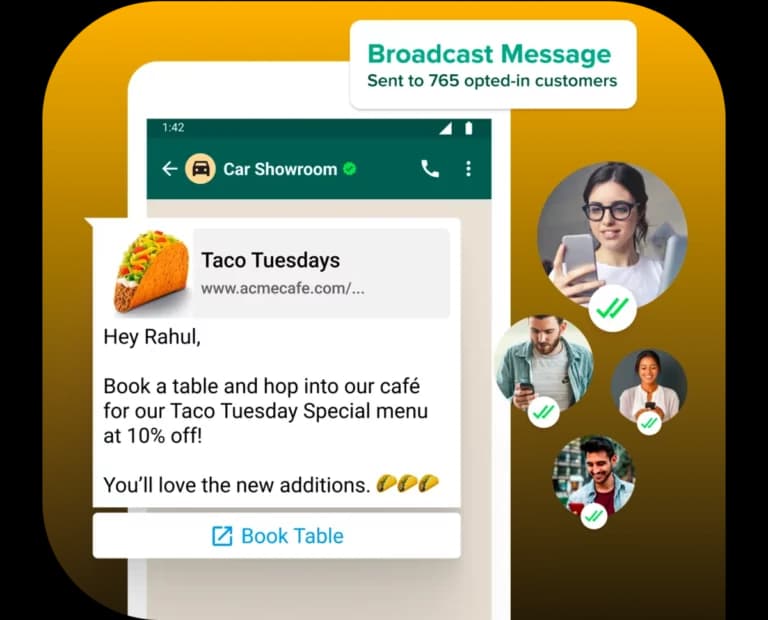
WhatsApp Broadcast API is the bulk-messaging capability of WhatsApp Business API. It allows a business to send one approved template message to a large list of opted-in customers in a single campaign- order updates, promotional offers, payment reminders, or event notifications- without the recipient limit or opt-in restrictions of the free Business App.
- Sent to customers who have opted in (via DLT-style consent or existing relationship)
- Must use a Meta-approved message template- free-form text broadcasts aren't allowed
- Billed per 24-hour conversation window opened, based on template category
- No practical limit on recipient list size (subject to your messaging tier and quality rating)
WhatsApp Broadcast API vs Business App broadcast
| Aspect | WhatsApp Business App | WhatsApp Broadcast API |
|---|---|---|
| Max recipients per broadcast | 256 contacts | Unlimited (tier-dependent) |
| Recipient must have your number saved | Yes | No |
| Message format | Free text | Meta-approved template only |
| Automation / CRM integration | No | Yes |
| Analytics | Basic | Delivery, read rate, click tracking |
| Best suited for | Very small businesses | Businesses sending at scale |
Max recipients per broadcast
- WhatsApp Business App
- 256 contacts
- WhatsApp Broadcast API
- Unlimited (tier-dependent)
Recipient must have your number saved
- WhatsApp Business App
- Yes
- WhatsApp Broadcast API
- No
Message format
- WhatsApp Business App
- Free text
- WhatsApp Broadcast API
- Meta-approved template only
Automation / CRM integration
- WhatsApp Business App
- No
- WhatsApp Broadcast API
- Yes
Analytics
- WhatsApp Business App
- Basic
- WhatsApp Broadcast API
- Delivery, read rate, click tracking
Best suited for
- WhatsApp Business App
- Very small businesses
- WhatsApp Broadcast API
- Businesses sending at scale
Everything you need to run
broadcast campaigns
Segmented targeting, approved templates, and full delivery analytics on every send.
Segmented Audience Targeting
Send to specific customer groups based on behavior or CRM data.
Template Message Library
Pre-approved marketing, utility, and authentication templates.
Scheduled Campaigns
Plan and queue broadcasts in advance.
Delivery & Read-Rate Analytics
Track sent, delivered, read, and replied metrics per campaign.
Personalization Variables
Insert customer name, order ID, or other dynamic fields.
Opt-Out Handling
Automatic suppression of unsubscribed contacts.
A/B Template Testing
Compare performance across message variants.
Broadcast message categories & pricing
Meta bills broadcast messages by conversation category, opened per 24-hour window.
Marketing
Promotional offers, campaigns, product announcements
Utility
Order updates, delivery notifications, account alerts
Authentication
OTPs and login verification codes
5 steps to launch your WhatsApp broadcast campaign
Build or select a customer list
Import contacts with valid opt-in consent.
Create or choose an approved template
Follow Meta-approved message template guidelines.
Segment your audience
Optional- by location, purchase history, or engagement.
Schedule or send immediately
Via Get Click Media's broadcast dashboard.
Track performance
Delivery rate, read rate, replies, and conversions in real time.
We protect your number's quality rating
Get Click Media manages template approval, audience segmentation, delivery optimization, and quality rating monitoring- so your broadcasts reach customers reliably without risking your number's messaging tier or quality score.
WhatsApp Broadcast across every industry
The same broadcast infrastructure adapts to very different messages, from flash-sale alerts to EMI reminders, depending on what each industry needs to tell its customers.
E-commerce
Flash sale announcements, cart recovery, restock alerts
BFSI
Payment due reminders, EMI notifications, policy renewal alerts
Healthcare
Appointment reminders, health camp announcements
Real Estate
New project launches, site visit invitations
Education
Admission open alerts, fee due reminders
Retail
Seasonal offers, loyalty program updates
We protect your number's quality rating
Get Click Media is an official Meta Business Solution Provider based in Bengaluru, running WhatsApp Broadcast campaigns for 10,000+ Indian businesses. We manage template approval, audience segmentation, delivery optimization, and quality rating monitoring- so your broadcasts reach customers reliably without risking your number's messaging tier or quality score.

Related WhatsApp Business API resources

One message could
change your business.
Big or small, we power communication for all- talk to us today.
Questions about WhatsApp Broadcast API
A WhatsApp Business API feature that lets businesses send one approved template message to a large list of opted-in customers in a single campaign.
Unlike the free Business App's 256-contact limit, Broadcast API has no practical recipient cap- it depends on your messaging tier.
No- unlike the free app, Broadcast API doesn't require recipients to have your number saved.
No- broadcasts must use a Meta-approved template. Free-form text broadcasts aren't permitted. See template message guidelines.
Per conversation window opened, based on template category- marketing, utility, or authentication. See full WhatsApp API pricing.
Yes- Get Click Media's dashboard provides delivery, read, and reply analytics per campaign.
Yes, when sent to properly opted-in customers using approved templates; Get Click Media ensures campaigns follow Meta's commerce and messaging policies.
Yes- templates support dynamic variables like customer name, order ID, and other personalization fields.
Ready to reach thousands of customers at once?
Get Click Media sets up your broadcast dashboard, templates, and audience segments- start sending compliant, high-reach campaigns today.