
01 · Prepare
Build the calling list
Start with a clean, relevant list containing the contacts and campaign information your agents need. Remove outdated entries and maintain clear consent and calling preferences before the campaign begins.
Automate outbound calling campaigns with an auto-dialer- reach more customers per hour, with agents spending their time on conversations instead of manual dialing.
Progressive & predictive dialing · Live agent handoff · 10,000+ Indian businesses
Trusted by 10,000+ businesses across India




















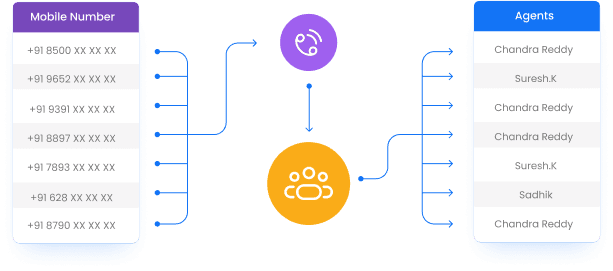
An auto-dialer is a system that automatically places outbound calls from a list, one after another, instead of an agent manually dialing each number. When a call is actually answered, the system connects a live agent- so the agent's time goes toward conversations, not toward dialing numbers that ring out, go to voicemail, or never connect at all. In some configurations, an auto-dialer can also play a pre-recorded message directly without an agent, though that use case sits closer to voice broadcast.
Auto-dialers are built for higher call-volume outbound campaigns that still need a real, live agent conversation- distinct from a pure broadcast, which never involves an agent at all.
Both place outbound calls at scale- the difference is whether a live agent is on the other end. See Voice Broadcast (OBD) for the no-agent version.
| Aspect | Auto-Dialer | Voice Broadcast (OBD) |
|---|---|---|
| What plays when a call connects | Connects a live agent, or in some setups a pre-recorded message | The same pre-recorded message, every time |
| Agent involvement | Typically yes- a live agent handles the conversation once answered | None- fully automated, no agent |
| Best for | Sales calls, collections, surveys- interactions needing a real conversation | Alerts, reminders, announcements at very high volume |
| What it saves | Agent time spent manually dialing numbers that don't connect | Agent time entirely- no agent is used |
What plays when a call connects
Agent involvement
Best for
What it saves
Dials one number as soon as an agent becomes available, and connects the agent only once the call is actually answered. Simple, predictable, and keeps agents from ever facing more than one live call at a time.
Dials ahead of agent availability, using expected answer and connect patterns to keep a steady stream of live calls reaching agents with minimal idle time between conversations- common in larger outbound sales and collections operations.
An outbound campaign becomes easier to manage when the calling list, dialing mode, agent availability, call outcomes, and follow-up actions are treated as one workflow. The dialer handles the repetitive dialing step while agents focus on connected conversations.
Start with a clean, relevant list containing the contacts and campaign information your agents need. Remove outdated entries and maintain clear consent and calling preferences before the campaign begins.
Select progressive or predictive dialing based on team size, campaign volume, and how tightly you need call pacing to match agent availability.
The system places the outbound calls and routes connected conversations to available agents, reducing time spent manually dialing, waiting for rings, or navigating disconnected numbers.
Review connected calls, unanswered calls, busy numbers, voicemail outcomes, and agent activity to understand how the campaign performed and what should happen next.
The purpose of an auto-dialer is not simply to place more calls. It is to reduce repetitive dialing work so the team has more of its available time for actual conversations. That makes the right call pacing, clean lists, and accurate outcome reporting important parts of the overall campaign.
Work through a lead list faster, with agents spending their time talking to prospects instead of manually dialing and waiting for rings.
Reach customers with overdue or upcoming payments at scale, connecting an agent for the calls that actually get answered.
Run outbound survey calls across a large respondent list without agents burning time on numbers that don't connect.
Confirm upcoming appointments across a full schedule- clinics, service centers, consultations- at a volume manual dialing can't match.
Different outbound campaigns have different goals. A sales team may prioritize live conversations and lead follow-up, while a collections team may care about contact rates, agent productivity, and structured follow-up after each connected call.
Prioritize contacts that need an actual conversation. The dialer can work through the list while sales representatives spend more of their time discussing the enquiry, qualification, product, or next step with connected prospects.
Structured calling campaigns can help teams work through reminder lists efficiently, while agents handle the customers who actually answer and require a conversation about the account or payment.
Large respondent lists can be easier to work through when agents are not spending time manually dialing every contact. Connected calls can then follow a structured survey or feedback script.
Teams can use outbound calling to confirm appointments, consultations, service visits, or scheduled sessions, helping staff work through a day's contact list without repeated manual dialing.
A connected call, no-answer result, busy response, and voicemail may each require a different follow-up. Defining those next steps before launch helps the calling team use the dialer consistently and makes campaign reporting more useful.
Responsible outbound calling requires respecting do-not-call preferences and maintaining clean, consented call lists- the same discipline expected of any outbound channel on this platform. Because an auto-dialer can work through a list faster than manual dialing, keeping that list current and properly consented matters even more, not less. Get Click Media helps structure auto-dialer campaigns with this discipline built in from the start.
See how a campaign performed and how efficiently agent time was used. See the full Call Analytics & Reporting page.
Connected, no answer, busy, and voicemail counts for every campaign, so you know exactly how a list performed.
Calls handled per agent and time spent on live conversations versus idle time waiting for a connected call.
The operational benefit of an auto-dialer is closely connected to how much manual dialing work it removes. Looking at agent activity alongside call outcomes helps teams understand whether the campaign is creating more productive conversation time.
Track how much available agent time is spent on actual customer conversations compared with time spent waiting for a number to connect.
Review how often the list produces connected calls, no-answer results, busy numbers, or voicemail outcomes so the team can improve list quality and pacing.
Compare campaign demand with available agents so the dialing mode and campaign pacing do not create unnecessary idle time or an unmanageable stream of calls.
Run auto-dialer campaigns alongside voice broadcast, IVR, and call analytics on one account, so outbound campaigns and inbound flows share the same reporting dashboard instead of living in separate tools.

One message could
change your business.
Big or small, we power communication for all- talk to us today.
A little preparation helps an auto-dialer campaign run more smoothly. The goal is to make sure the list, team, dialing mode, and follow-up process are ready before calls start moving at scale.
Remove stale or duplicate contacts, keep calling preferences current, and ensure the list is relevant to the campaign objective.
Make sure agents understand the campaign purpose, expected conversation flow, qualification questions, and the action required after each connected call.
Choose progressive or predictive dialing based on campaign volume, team size, desired pacing, and the level of control needed over live-call delivery.
Define what should happen after a connected call, no-answer result, busy response, or voicemail so agents and follow-up teams work from the same process.
These answers cover the practical questions teams usually have before starting an outbound calling campaign, including dialing modes, agent involvement, compliance, reporting, pricing, and how auto-dialing fits alongside IVR and voice broadcast.
An auto-dialer is a system that automatically places outbound calls from a list, one after another, instead of an agent manually dialing each number. It connects the agent only once a call is actually answered, or in some configurations plays a pre-recorded message directly- built for outbound campaigns that need higher call volume with agent involvement.
Voice broadcast plays the same pre-recorded message to everyone on a list with no live agent involved at all. An auto-dialer is typically used when you do want a live agent conversation- it just removes the time an agent would otherwise waste manually dialing numbers that don't connect, ring out, or hit voicemail. See Voice Broadcast (OBD).
Progressive dialing dials one number per available agent and connects the agent only when the call is answered- simple and predictable. Predictive dialing dials ahead of agent availability based on expected answer and connect patterns, keeping a steadier flow of live calls reaching agents- more common in larger outbound sales or collections operations.
In most auto-dialer setups, yes- the system dials on the agent's behalf and hands over the call once it's answered. Some configurations can also play a pre-recorded message directly without an agent, but that use case overlaps more with voice broadcast than a typical auto-dialer campaign.
Sales outreach and lead follow-up, payment or collections reminder calls, survey and feedback campaigns, and appointment confirmation calls at scale- any outbound campaign where agents need to work through a large call list efficiently.
Responsible outbound calling requires respecting do-not-call preferences and maintaining clean, consented call lists- the same discipline expected of any outbound channel on this platform. Get Click Media helps structure auto-dialer campaigns with that discipline built in from the start.
Yes- an auto-dialer is designed to work alongside your existing agent team, feeding them connected calls instead of replacing their role. Agents still handle the actual conversation; the dialer just removes the manual dialing work.
Call outcome reporting- connected, no answer, busy, voicemail- alongside agent productivity metrics, so you can see both how a campaign performed and how efficiently agent time was used. See Call Analytics & Reporting.
Auto-dialer pricing depends on your call volume, number type, and features required. Contact us for a custom quote based on your expected campaign size.
Yes- some campaigns route a connected call through a short IVR-style prompt before or instead of a live agent, particularly for lower-priority calls. Most businesses run auto-dialer campaigns for agent-led conversations and reserve IVR for inbound self-service. See the IVR System.
Get Click Media sets up your auto-dialer campaign- dialing mode, agent handoff, and reporting- ready to launch.