
In this article
Explore the key concepts, practical considerations, and frequently asked questions related to whatsapp template message rejected? common reasons and fixes.
Key takeaways
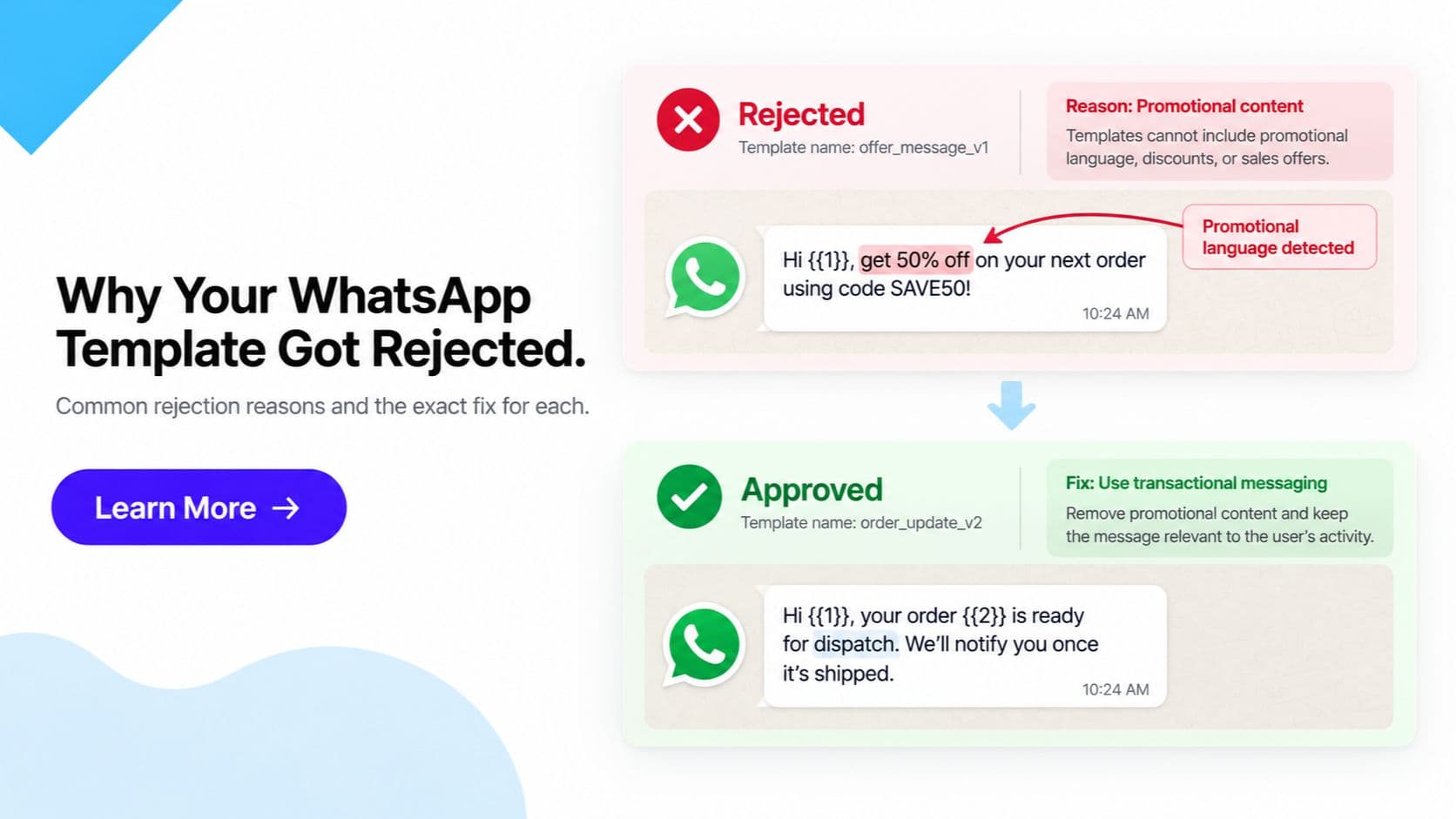
- Utility templates get automatically recategorized as Marketing if they contain promotional language, discount mentions, or upsell content.
- Variable placeholders like {{1}} and {{2}} must be numbered sequentially with no gaps, each backed by an example value at submission.
- Resubmitting an identical rejected template fails again for the same reason; you must meaningfully edit the content or rename it.
A WhatsApp template gets rejected when its content violates Meta's WhatsApp Business Messaging Policy or doesn't meet basic formatting requirements- the fix depends on the specific reason shown in WhatsApp Manager, but the most common causes are promotional language in a Utility template, broken variable placeholders, prohibited content for your industry, formatting errors, or a mismatched call-to-action button. This post covers what to check and fix once a template has already been rejected.
If you haven't submitted a template yet and want the full process- categories, formatting rules, review timelines- see our WhatsApp template approval guide. This post is the narrower companion for when a template has already come back rejected and you need to know exactly what to change.
Common Rejection Reasons and Fixes
| Rejection reason | Why it happens | Fix |
|---|---|---|
| Promotional language in a Utility template | Utility templates are meant for transactional updates (order status, OTPs, appointment reminders). Discount mentions, offers, or upsell language cause Meta to recategorize or reject the template. | Keep Utility templates strictly transactional. Move any promotional content into a Marketing-category template instead. |
| Missing or malformed variable placeholders | Variables like {{1}}, {{2}} must be numbered sequentially with no gaps, and every placeholder needs an example value at submission. Broken or inconsistent numbering triggers automatic rejection. | Test all variables and example values before submitting. Confirm numbering runs sequentially with no skipped or duplicate numbers. |
| Prohibited content for the industry | Some regulated categories (finance, healthcare, gambling, and others) have restricted claims and language under Meta's policy. | Review Meta's WhatsApp Business Messaging Policy for your specific industry before writing template copy. |
| Broken formatting or typos in header/body | Formatting errors, placeholder text left in by mistake, or typos in the header or body reduce approval odds and look unprofessional. | Proofread and preview the template exactly as a customer will see it before submitting. |
| Call-to-action button doesn't match content | Using a button type (Call Phone Number, Visit Website, Quick Reply) that doesn't correspond to what the template actually offers. | Match the button type to the real action- only add a phone or website button if the template content supports it. |
Note: Meta's automated review system checks structure and policy compliance together, so a template can fail for more than one reason at once. Address every issue you can identify, not just the one Meta names first.
What to Do After a Rejection
- Read the specific rejection reason shown in WhatsApp Manager (Meta Business Manager > WhatsApp Manager > Message Templates). The reason listed against the rejected template is the starting point- don't guess.
- Edit the content to address that specific reason. If it was recategorized for promotional language, strip that language. If a variable was malformed, fix the numbering and example values.
- Do not resubmit an identical template. Meta will reject a template with unchanged content and the same name for the same reason again. You need to either meaningfully edit the existing template or create a new template with a different name.
- Resubmit and monitor status. Most reviews complete within a few minutes to a few hours. Repeated identical resubmissions without changes can slow down review, not speed it up.
Tip: If you're unsure whether an edit is "meaningful" enough, change the wording substantively rather than a single word- Meta's review looks at overall content, not just superficial edits.
Reducing Rejection Risk Going Forward
- Match language to category. Utility stays transactional; anything promotional belongs in Marketing. This single distinction prevents the most common rejection and recategorization issues.
- Test before submission. Preview the rendered template with real example values for every variable, and confirm the header, body, footer, and buttons all display correctly.
- Review Meta's policy periodically. Content policies are updated over time, and what was acceptable previously can become restricted. Checking the WhatsApp Business Messaging Policy occasionally- especially before launching a new template category or entering a regulated vertical- reduces surprises.
- Keep a template style checklist. Standardizing variable formatting, button usage, and category language across your team cuts down on repeat rejections from the same avoidable mistakes.
Frequently Asked Questions
Why was my WhatsApp template rejected with no clear reason given? Meta's rejection reason is shown in WhatsApp Manager next to the template status, but it can be generic (for example, just "Incorrect Category"). If the stated reason doesn't fully explain the rejection, check the template against the most common causes- promotional wording in a Utility template, broken variable placeholders, prohibited content for your industry, or formatting errors- before resubmitting.
Can I resubmit the exact same rejected template again? No. Submitting an identical template with no changes will almost always be rejected again for the same reason. You need to either meaningfully edit the content to address the stated rejection reason, or create a new template with a different name. Simply clicking resubmit without changes does not work.
How long does WhatsApp template review take? Most templates are reviewed within a few minutes to a few hours, though it can occasionally take longer during high review volume. If a template has been pending for an unusually long time, check WhatsApp Manager for status updates rather than resubmitting, which can reset the review queue.
Why was my Utility template recategorized as Marketing? Meta automatically recategorizes templates based on content, not just the category you selected at submission. If a Utility template (meant for transactional updates like order confirmations or OTPs) contains promotional language, discount mentions, or upsell content, Meta will reclassify it as Marketing- which changes its messaging cost and eligibility. Fix: keep Utility templates strictly transactional with no promotional language.
What is the correct format for template variables?
Variables must use the format {{1}}, {{2}}, {{3}} and so on, numbered sequentially starting from 1 with no gaps or repeats in numbering. Every variable placeholder in the template body must have a corresponding example value provided at submission. Missing, malformed, or inconsistently numbered placeholders are a common cause of automatic rejection.
Are there industries with extra restrictions on template content? Yes. Certain regulated categories- including financial services, healthcare, gambling, and adult content- have additional restrictions on the claims and language templates can use. If your business operates in a regulated industry, review Meta's WhatsApp Business Messaging Policy for category-specific rules before submitting templates.
Does a rejected template affect my WhatsApp quality rating? A rejected template itself does not affect your number's quality rating, since it never gets sent to customers. Quality rating is affected by how recipients respond to templates that are approved and actually sent- blocks, reports, and negative feedback- not by rejections at the review stage.
Can a call-to-action button cause a template to be rejected? Yes. If the button type doesn't match the content- for example, using a "Call Phone Number" button on a template that has nothing to do with calling, or a "Visit Website" button pointing to an unrelated or missing URL- Meta can reject the template for a mismatch between stated action and actual content.
Where do I see the exact rejection reason for my template? Open WhatsApp Manager in Meta Business Manager, go to Message Templates, and find the rejected template- its status column and detail view show the specific rejection reason Meta assigned. Get Click Media's dashboard also mirrors this status for templates submitted through our platform.
Get WhatsApp Business API- Start Onboarding · Request a Demo
Article topics
Frequently Asked Questions
Why was my WhatsApp template rejected with no clear reason given?
Meta's rejection reason is shown in WhatsApp Manager next to the template status, but it can be generic (for example, just 'Incorrect Category'). If the stated reason doesn't fully explain the rejection, check the template against the most common causes- promotional wording in a Utility template, broken variable placeholders, prohibited content for your industry, or formatting errors- before resubmitting.
Can I resubmit the exact same rejected template again?
No. Submitting an identical template with no changes will almost always be rejected again for the same reason. You need to either meaningfully edit the content to address the stated rejection reason, or create a new template with a different name. Simply clicking resubmit without changes does not work.
How long does WhatsApp template review take?
Most templates are reviewed within a few minutes to a few hours, though it can occasionally take longer during high review volume. If a template has been pending for an unusually long time, check WhatsApp Manager for status updates rather than resubmitting, which can reset the review queue.
Why was my Utility template recategorized as Marketing?
Meta automatically recategorizes templates based on content, not just the category you selected at submission. If a Utility template (meant for transactional updates like order confirmations or OTPs) contains promotional language, discount mentions, or upsell content, Meta will reclassify it as Marketing- which changes its messaging cost and eligibility. Fix: keep Utility templates strictly transactional with no promotional language.
What is the correct format for template variables?
Variables must use the format {{1}}, {{2}}, {{3}} and so on, numbered sequentially starting from 1 with no gaps or repeats in numbering. Every variable placeholder in the template body must have a corresponding example value provided at submission. Missing, malformed, or inconsistently numbered placeholders are a common cause of automatic rejection.
Are there industries with extra restrictions on template content?
Yes. Certain regulated categories- including financial services, healthcare, gambling, and adult content- have additional restrictions on the claims and language templates can use. If your business operates in a regulated industry, review Meta's WhatsApp Business Messaging Policy for category-specific rules before submitting templates.
Does a rejected template affect my WhatsApp quality rating?
A rejected template itself does not affect your number's quality rating, since it never gets sent to customers. Quality rating is affected by how recipients respond to templates that are approved and actually sent- blocks, reports, and negative feedback- not by rejections at the review stage.
Can a call-to-action button cause a template to be rejected?
Yes. If the button type doesn't match the content- for example, using a 'Call Phone Number' button on a template that has nothing to do with calling, or a 'Visit Website' button pointing to an unrelated or missing URL- Meta can reject the template for a mismatch between stated action and actual content.
Where do I see the exact rejection reason for my template?
Open WhatsApp Manager in Meta Business Manager, go to Message Templates, and find the rejected template- its status column and detail view show the specific rejection reason Meta assigned. Get Click Media's dashboard also mirrors this status for templates submitted through our platform.
About the author
Get Click Media creates practical resources for businesses using messaging, automation, analytics, and digital communication to improve customer engagement. This article was published on .