
Cloud Call Center Software for Indian Businesses
Run your whole call center from one cloud platform. Our call center software brings inbound and outbound calling, IVR, auto dialer, call recording, live monitoring, and WhatsApp together, and your agents work from anywhere with no hardware.
Agents work from anywhere · No hardware · 10,000+ Indian businesses
Reviewed by the Get Click Media voice & telephony team · Last updated
Trusted by 10,000+ businesses across India


















What Is Cloud Call Center Software?
Cloud call center software is a contact center that runs on the internet. Your team answers and makes customer calls from a browser or phone, while routing, IVR, dialing, recording, and reports all run on the provider's cloud platform, with no hardware in your office.
A traditional call center needed a server room, an EPABX, desk phones, and an IT team to keep it running. Cloud based call center software replaces all of that with a monthly subscription. You can open a virtual call center with agents in three cities in a few days, scale up for a festive season, and scale back down afterwards.
Because it's built on the same platform as our cloud telephony, WhatsApp, and SMS, your call center isn't limited to voice: a missed call can trigger a WhatsApp message, and an agent can follow up a call on WhatsApp without switching tools.
Key Features
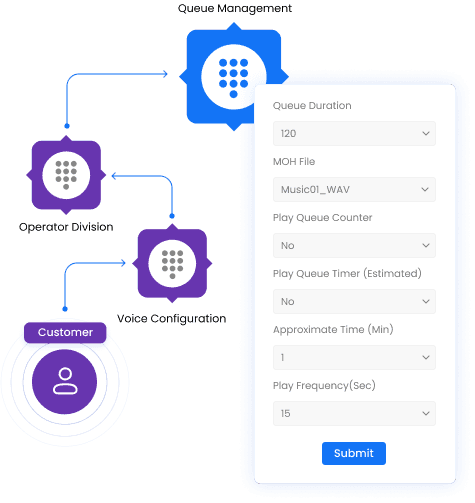
ACD (Automatic Call Distribution)
Distribute calls by round-robin, skills, priority, wait time, or sticky agent, so every caller reaches the right person fast.
IVR
Multi-level IVR greets callers, offers self-service, and routes them to the right queue before an agent picks up.
Auto Dialer
Progressive and predictive dialing keep agents talking instead of dialling, for sales, collections, and follow-ups.
Call Recording
Every call recorded and searchable, for quality checks, training, and dispute resolution.
Live Monitoring
Watch queues, calls in progress, and agent status on a live dashboard, and act before callers start waiting.
CRM Integration
Customer details pop up when a call arrives, and every call, recording, and outcome is logged back to the CRM.
WhatsApp Omnichannel
Follow up a call on WhatsApp or SMS from the same platform, or send a missed caller a WhatsApp message automatically.
Reports & Analytics
Real-time and historical reports on AHT, answer rate, missed calls, and agent productivity.
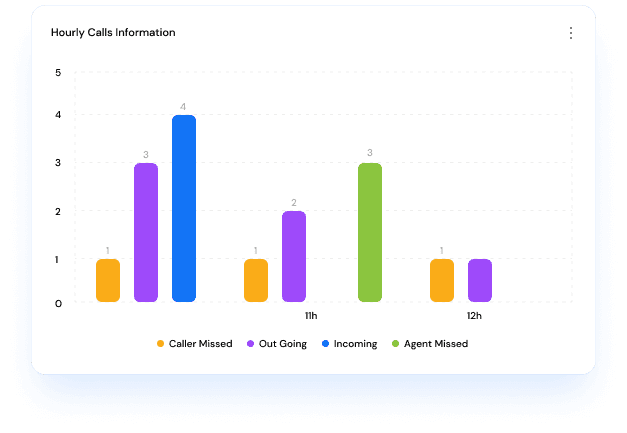
See your whole call center at a glance
Track incoming, outgoing, caller-missed, and agent-missed calls hour by hour, so supervisors can spot a queue building up and move agents before customers wait.
Explore call analyticsInbound & Outbound Call Center
Inbound call center
- Toll free or virtual numbers with IVR self-service
- ACD routing by skill, language, or priority
- Queue announcements, callbacks, and after-hours rules
- Best for customer support, helplines, and order enquiries
Outbound call center
- Progressive and predictive auto dialers
- Lead lists imported from CSV or synced from your CRM
- Calls from TRAI-compliant 140/1600 series numbers where required
- Best for sales, collections, renewals, and surveys
Most teams run both on one platform: the same agents take inbound calls between outbound campaigns, and every call shows up in the same reports.
CCaaS vs On-Premise Call Center
CCaaS (Contact Center as a Service) means you rent your contact center from a cloud provider instead of building it. The provider runs the telephony, software, and infrastructure; you pay per agent and per minute, and get new features as they're released. Here's how it compares with running your own:
| Aspect | CCaaS (cloud) | On-premise |
|---|---|---|
| Upfront cost | None: pay monthly | Servers, PBX hardware, licences, and installation |
| Time to launch | Days | Weeks to months |
| Remote agents | Work from anywhere with a phone or browser | Need VPNs and office hardware |
| Scaling up or down | Add or remove agents any month | Buy capacity for your peak and pay for it all year |
| Updates & maintenance | Included, done by the provider | Your IT team's job |
| Omnichannel | Voice, WhatsApp, and SMS on one platform | Usually voice only, or separate tools |
Upfront cost
- CCaaS (cloud)
- None: pay monthly
- On-premise
- Servers, PBX hardware, licences, and installation
Time to launch
- CCaaS (cloud)
- Days
- On-premise
- Weeks to months
Remote agents
- CCaaS (cloud)
- Work from anywhere with a phone or browser
- On-premise
- Need VPNs and office hardware
Scaling up or down
- CCaaS (cloud)
- Add or remove agents any month
- On-premise
- Buy capacity for your peak and pay for it all year
Updates & maintenance
- CCaaS (cloud)
- Included, done by the provider
- On-premise
- Your IT team's job
Omnichannel
- CCaaS (cloud)
- Voice, WhatsApp, and SMS on one platform
- On-premise
- Usually voice only, or separate tools
Integrations: CRM & Helpdesk
When a call comes in, agents see who's calling and their history from your CRM. When it ends, the call, recording, and outcome are logged back automatically, with no copy-pasting.
Need something custom? Use the voice API and webhooks.
Pricing per Agent
Call center software pricing has two parts: a monthly plan per agent seat, based on your team size and the features you need, and call minutes on our published voice rate card, from ₹0.40 per minute down to ₹0.22 per minute at 1,00,000+ minutes a month.
- No hardware or setup fee
- Add or remove agents any month
- IVR, recording & reports included
- One bill for voice, WhatsApp & SMS
Tell us how many agents you have and your monthly call volume, and we'll send a per-agent quote. See voice call rates.
How Shipline Cut "Where Is My Order" Calls
Shipline, an Indian logistics company, had a support team buried under "where is my shipment" calls every time a consignment moved. Agents spent most of their day reading out tracking updates instead of solving real delivery problems.
We combined IVR self-service tracking with automated WhatsApp and SMS shipment updates. Shipline's team is now seeing more shipment queries resolved through automated updates and self-service, freeing agents for the delivery issues that actually need them.

One message could
change your business.
Big or small, we power communication for all- talk to us today.
Call Center Software FAQs
Cloud call center software lets your team handle inbound and outbound customer calls over the internet, without office hardware. Calls, IVR, routing, dialing, recording, and reports all run on the provider's platform, and agents work from a browser or phone anywhere.
CCaaS stands for Contact Center as a Service. Instead of buying and running contact center hardware and software yourself, you subscribe to it from a cloud provider and pay monthly. Get Click Media's cloud call center is a CCaaS platform.
Call center software traditionally means voice only. Contact center software adds other channels such as WhatsApp, SMS, and email. Get Click Media covers both: voice calling plus WhatsApp and SMS from the same account.
Yes. Agents log in from a browser or take calls on their mobile phones from anywhere. Supervisors still see every call, queue, and agent status live, so remote teams stay fully managed.
Yes. Inbound calls are handled with IVR and ACD routing, and outbound campaigns run on progressive or predictive auto dialers, all in the same dashboard and reports. See the auto dialer.
Pricing is based on your number of agents and call minutes. Calls follow our voice rate card of ₹0.40 to ₹0.22 per minute depending on volume, and the per-agent plan is quoted on your team size and features. There's no hardware or setup fee. See voice call rates.
Yes. It integrates with CRMs and helpdesks such as Zoho, Salesforce, HubSpot, LeadSquared, and Freshworks, showing caller details when a call arrives and logging every call back to the record.
Most teams go live within a few days: numbers within 24 hours of KYC, then IVR, queues, and agent setup. There's nothing to install.
Ready to move your call center to the cloud?
Book a free demo and we'll show you how your team can run inbound, outbound, and WhatsApp from one cloud call center.