
In this article
Explore the key concepts, practical considerations, and frequently asked questions related to rcs rich cards and carousels: what they look like in practice.
Key takeaways
- A standalone rich card holds one image or video, a title up to 200 characters, a description up to 2,000 characters, and 2-4 action buttons.
- Carousels support up to 10 swipeable cards, but a curated 4-6 card set holds attention better than a maxed-out deck.
- Recommended card images run 1440x720px landscape or 720x1440px portrait, kept under roughly 5MB so they load quickly on mobile data.
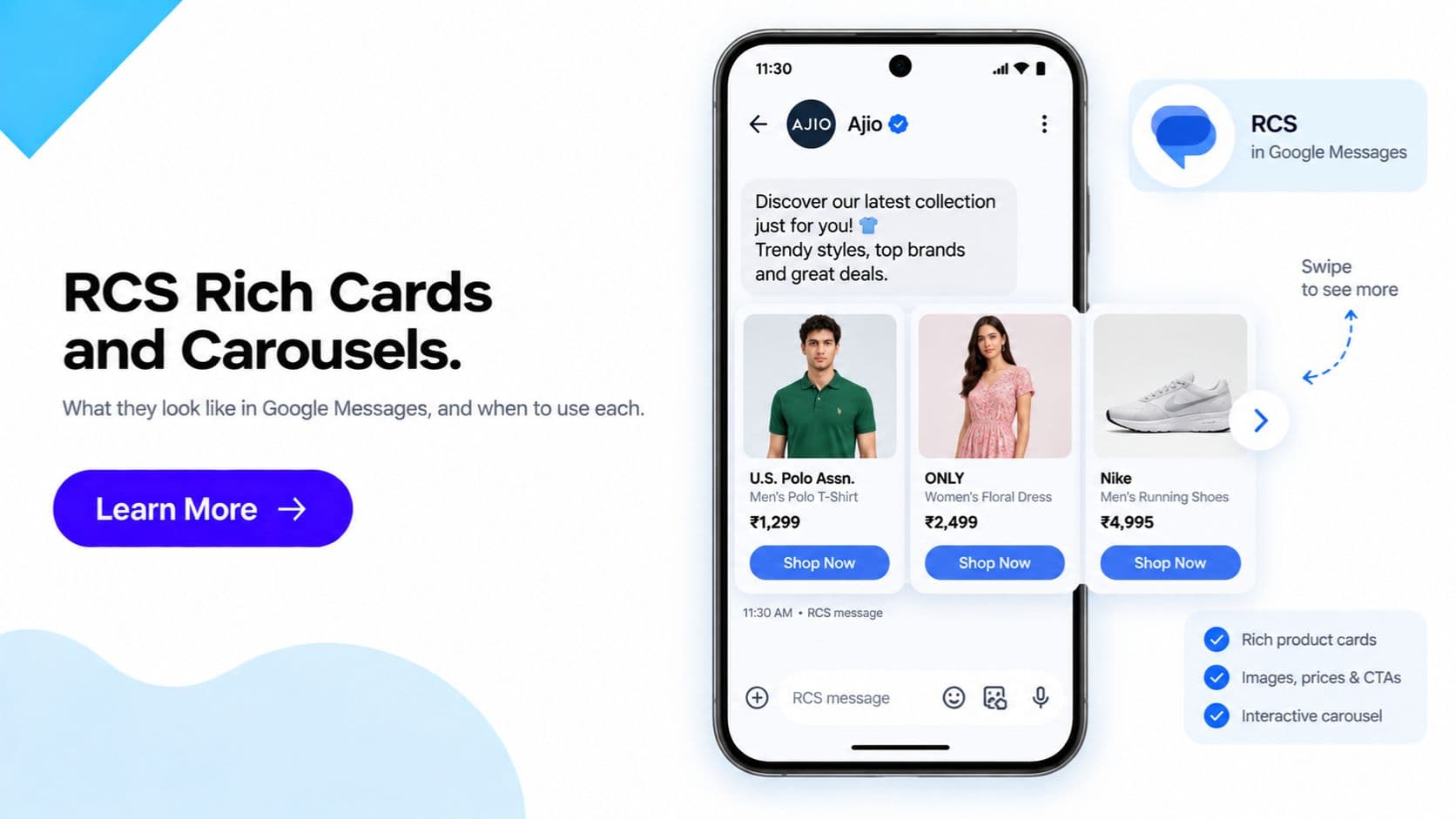
A standalone RCS rich card is a single message that combines one image or video, a title, a short description, and up to 2-4 tappable action buttons- all rendered natively inside the Google Messages (or iOS 18+ Messages) thread, with no link to click and no app to open. A carousel is simply several of these rich cards placed together in one message, which the recipient swipes through horizontally to browse multiple options.
Our complete RCS Business Messaging features guide covers the full feature set- verified sender, read receipts, two-way messaging, analytics, and more. This guide is narrower and more practical: what a rich card and a carousel actually look like once they land in a customer's inbox, when to reach for one versus the other, and the design details that separate a card that gets tapped from one that gets ignored.
In one line: A rich card is for one message with one clear action. A carousel is for browsing- multiple products, multiple steps, or multiple options in a single swipeable message.
What Message Formats Does RCS Support?
RCS Business Messaging supports these formats, based on Google's RBM documentation:
| Format | What it is | Typical use |
|---|---|---|
| Text | Plain text message, longer than an SMS and with no 160-character segments | Alerts, updates, replies |
| Media file | An image, GIF, video, or PDF sent on its own | Product photos, invoices, tickets |
| Standalone rich card | One card with media, a title, a description, and suggestion buttons | A single offer or action |
| Carousel | 2–10 rich cards side by side that the user swipes through | Product catalogues, options, step-by-step flows |
| Suggested replies | Tappable chips that send a preset reply back to you | Quick answers: Yes/No, choosing a slot |
| Suggested actions | Buttons that do something on the phone: open a URL, dial a number, view or share a location, add a calendar event | Calls to action |
All of these show the verified business name and logo, and support read receipts. If a recipient can't receive RCS, the message is sent as SMS fallback, which can only carry text and a link.
The rest of this guide focuses on the two richest formats: rich cards and carousels.
What a Standalone Rich Card Looks Like
A rich card is the basic building block of RCS visual messaging. It renders as a single card inside the message thread, containing:
- One image or video thumbnail- the primary visual, shown at the top of the card
- A title- a short headline, up to 200 characters
- A description- supporting text, up to 2,000 characters
- Up to 2 to 4 action buttons- Open URL, Call, View Location, or Quick Reply
The card appears as a single, self-contained unit in the conversation- image on top, text below, buttons at the bottom. There's no separate link to tap and no redirect through a shortened URL; the button itself carries the action. A customer sees the whole offer, confirmation, or instruction in one glance, and the button is the only next step required.
What a Carousel Looks Like
A carousel is a horizontal, swipeable sequence of rich cards- each card independently configured with its own image, title, description, and buttons- delivered as a single message. The customer swipes left or right through the deck and taps the button on whichever card is relevant to them.
Carousels are the natural format whenever a message needs to present more than one option: several products, a sequence of steps, or a set of plans to choose between. Each card in the carousel functions like its own mini rich card, but all of them live inside one conversational message rather than as separate sends.
Single Card vs Carousel: When to Use Each
| Scenario | Format | Why |
|---|---|---|
| One clear call to action ("Confirm Appointment", "Pay Now") | Single rich card | A single focused action performs best without competing choices on screen |
| Highlighting one specific product or offer | Single rich card | Keeps attention on the one item you want the customer to act on |
| Browsing multiple products or SKUs | Carousel | Lets the customer compare and pick their own preferred option |
| Step-by-step instructions (e.g. a multi-stage delivery or itinerary update) | Carousel | Each step becomes its own card, keeping the sequence easy to follow |
| Presenting multiple plan or pricing options | Carousel | Side-by-side comparison in one message, no need to send multiple texts |
| A single transactional confirmation (order placed, payment received) | Single rich card | One fact, one optional action- a carousel would add unnecessary choice |
The underlying rule is simple: if the message has exactly one job, use a single card. If the message's job is to let the customer choose or follow a sequence, use a carousel.
Practical Design Guidance
Building rich cards and carousels that actually convert comes down to a handful of consistent practices:
- Keep copy short. Card space is limited by design. A concise title and a description that gets to the point outperforms a dense paragraph- the card is meant to be scanned in a second or two, not read like an email.
- Lead with a clear primary image. The image is the first thing a customer sees before they even read the title. Use a sharp, relevant, well-lit image- a blurry or generic stock photo undermines the trust a rich card is supposed to build.
- Limit carousel length. Even though the format supports up to 10 cards, keeping a carousel to around 4-6 cards holds attention better than a longer set that customers abandon halfway through swiping.
- One primary action per card. Whether it's a single card or one card inside a carousel, resist the urge to add every possible button. A card with 1-2 clear buttons converts better than one crowded with 4 competing options.
- Always include an SMS-friendly fallback. Rich cards and carousels are RCS-specific- on a device or network where RCS isn't supported, the platform automatically falls back to SMS. Every campaign should define a short, plain-text fallback message with a link to the key action, so the message still lands cleanly for recipients outside RCS coverage.
Example Use Cases by Industry
Retail- product carousel. An e-commerce brand sends a 5-card carousel of new arrivals or top sellers in a category the customer has browsed before, each card with a product image, price, and a "View" or "Buy Now" button, so browsing happens directly inside the message thread instead of requiring an app or website visit.
Travel- multi-step itinerary cards. A travel brand or airline uses a carousel to walk a traveller through a sequence- booking confirmation, check-in reminder, and gate/boarding details as separate cards in one message- so the full journey status is visible and swipeable in a single thread instead of scattered across multiple texts.
Banking- EMI/offer carousel. A bank or NBFC presents a carousel of relevant offers or repayment options- for example, a pre-approved loan card, an EMI restructuring option, and a card offer- letting the customer compare and act on whichever is relevant, while a routine single-item alert like a payment due reminder stays a standalone rich card with one "Pay Now" button.
For ready-to-adapt copy structures for both formats, see our RCS message templates guide, and for the full list of what RCS Business Messaging supports beyond cards and carousels, see the RCS Business Messaging features guide.
Ready to design your own rich cards or carousels? Request a free RCS demo from Get Click Media →
Frequently Asked Questions
What is the difference between an RCS rich card and a carousel? A rich card is a single message unit- one image or video, a title, a description, and up to 2-4 action buttons. A carousel is a set of multiple rich cards placed side by side in one message, which the recipient swipes through horizontally. A rich card is for one focused message and one action. A carousel is for browsing multiple options in a single conversation thread.
How many cards should I put in an RCS carousel? Google's RCS specification supports up to 10 cards in a single carousel, but most high-performing campaigns use 4 to 6. Beyond that, engagement tends to drop off- recipients scroll through fewer cards more thoroughly than they scroll through a longer set, so a shorter, curated carousel usually outperforms a maximal one.
When should I use a single rich card instead of a carousel? Use a single rich card when there is exactly one thing you want the customer to do- confirm an appointment, pay a bill, view one specific product or offer. A single card keeps the message focused on one primary action instead of introducing choice, which is exactly what a carousel is for.
What happens to a rich card or carousel if the customer's device doesn't support RCS? The platform automatically falls back to a plain SMS version of the message when a device or network doesn't support RCS. The rich card layout, images, and buttons are RCS-specific and don't carry over to SMS, so every rich card or carousel campaign should have a concise, SMS-friendly fallback message with a text link for the key action, configured alongside the RCS version.
How many buttons can a rich card have? A standalone rich card supports up to 4 action buttons- these can be a mix of Open URL, Call, View Location, and Quick Reply types. In practice, most well-designed cards use 1 to 3 buttons rather than the full 4, since too many competing actions on one card dilutes the primary call to action.
Do rich cards and carousels work the same way on iPhone as on Android in India? Yes, largely. RCS rich cards and carousels render consistently on Android devices via Google Messages and on iPhones running iOS 18 and above, across Jio, Airtel, and Vi. Minor visual differences can appear between the two rendering apps, so it's good practice to preview a card or carousel on both platforms before a large send.
Can I include a video in an RCS rich card? Yes. A rich card supports an MP4 video thumbnail of up to 30 seconds for inline preview, in addition to standard JPEG, PNG, or GIF images. Video works well for product demos or short instructional content, but a strong static image is usually sufficient- and loads faster- for most standard use cases.
What size should images be for RCS rich cards and carousels? The recommended resolution is 1440x720px for landscape (horizontal) cards or 720x1440px for portrait (vertical) cards. Keeping the image file size under roughly 5MB helps the card load quickly inside the message thread, which matters for both engagement and the customer's data usage.
Article topics
Frequently Asked Questions
What is the difference between an RCS rich card and a carousel?
A rich card is a single message unit- one image or video, a title, a description, and up to 2-4 action buttons. A carousel is a set of multiple rich cards placed side by side in one message, which the recipient swipes through horizontally. A rich card is for one focused message and one action. A carousel is for browsing multiple options in a single conversation thread.
How many cards should I put in an RCS carousel?
Google's RCS specification supports up to 10 cards in a single carousel, but most high-performing campaigns use 4 to 6. Beyond that, engagement tends to drop off- recipients scroll through fewer cards more thoroughly than they scroll through a longer set, so a shorter, curated carousel usually outperforms a maximal one.
When should I use a single rich card instead of a carousel?
Use a single rich card when there is exactly one thing you want the customer to do- confirm an appointment, pay a bill, view one specific product or offer. A single card keeps the message focused on one primary action instead of introducing choice, which is exactly what a carousel is for.
What happens to a rich card or carousel if the customer's device doesn't support RCS?
The platform automatically falls back to a plain SMS version of the message when a device or network doesn't support RCS. The rich card layout, images, and buttons are RCS-specific and don't carry over to SMS, so every rich card or carousel campaign should have a concise, SMS-friendly fallback message with a text link for the key action, configured alongside the RCS version.
How many buttons can a rich card have?
A standalone rich card supports up to 4 action buttons- these can be a mix of Open URL, Call, View Location, and Quick Reply types. In practice, most well-designed cards use 1 to 3 buttons rather than the full 4, since too many competing actions on one card dilutes the primary call to action.
Do rich cards and carousels work the same way on iPhone as on Android in India?
Yes, largely. RCS rich cards and carousels render consistently on Android devices via Google Messages and on iPhones running iOS 18 and above, across Jio, Airtel, and Vi. Minor visual differences can appear between the two rendering apps, so it's good practice to preview a card or carousel on both platforms before a large send.
Can I include a video in an RCS rich card?
Yes. A rich card supports an MP4 video thumbnail of up to 30 seconds for inline preview, in addition to standard JPEG, PNG, or GIF images. Video works well for product demos or short instructional content, but a strong static image is usually sufficient- and loads faster- for most standard use cases.
What size should images be for RCS rich cards and carousels?
The recommended resolution is 1440x720px for landscape (horizontal) cards or 720x1440px for portrait (vertical) cards. Keeping the image file size under roughly 5MB helps the card load quickly inside the message thread, which matters for both engagement and the customer's data usage.
About the author
Get Click Media creates practical resources for businesses using messaging, automation, analytics, and digital communication to improve customer engagement. This article was published on .