
In this article
Explore the key concepts, practical considerations, and frequently asked questions related to whatsapp appointment reminders.
Key takeaways
- A three-touch sequence- instant confirmation, a 48-hour reminder, and a day-of reminder- gives customers repeated one-tap chances to reschedule.
- WhatsApp's near-98% open rate combined with Confirm/Reschedule/Cancel buttons cuts no-shows by roughly 30-40% versus call or SMS reminders.
- Reminders are sent as Utility-category templates, not Marketing, since they relate to an already-booked appointment rather than a new purchase.
Appointment no-shows are one of the most expensive, least-discussed leaks in Indian service businesses. A hospital OPD, a dental clinic, a salon, or a car service center all run on booked time slots- and every slot a customer forgets to show up for is revenue that cannot be recovered that day. WhatsApp appointment reminders fix this by putting Confirm, Reschedule, and Cancel buttons directly inside a message the customer is almost guaranteed to see.
Traditional reminder systems- a phone call from the front desk or a plain SMS- put the burden of action entirely on the customer. They have to remember to call back, sit on hold, or find time during business hours to reschedule. Most don't bother, and the slot simply goes empty. In Indian healthcare, salon, and service-center contexts, no-show rates on phone- or SMS-only reminder systems commonly run between 25% and 45%.
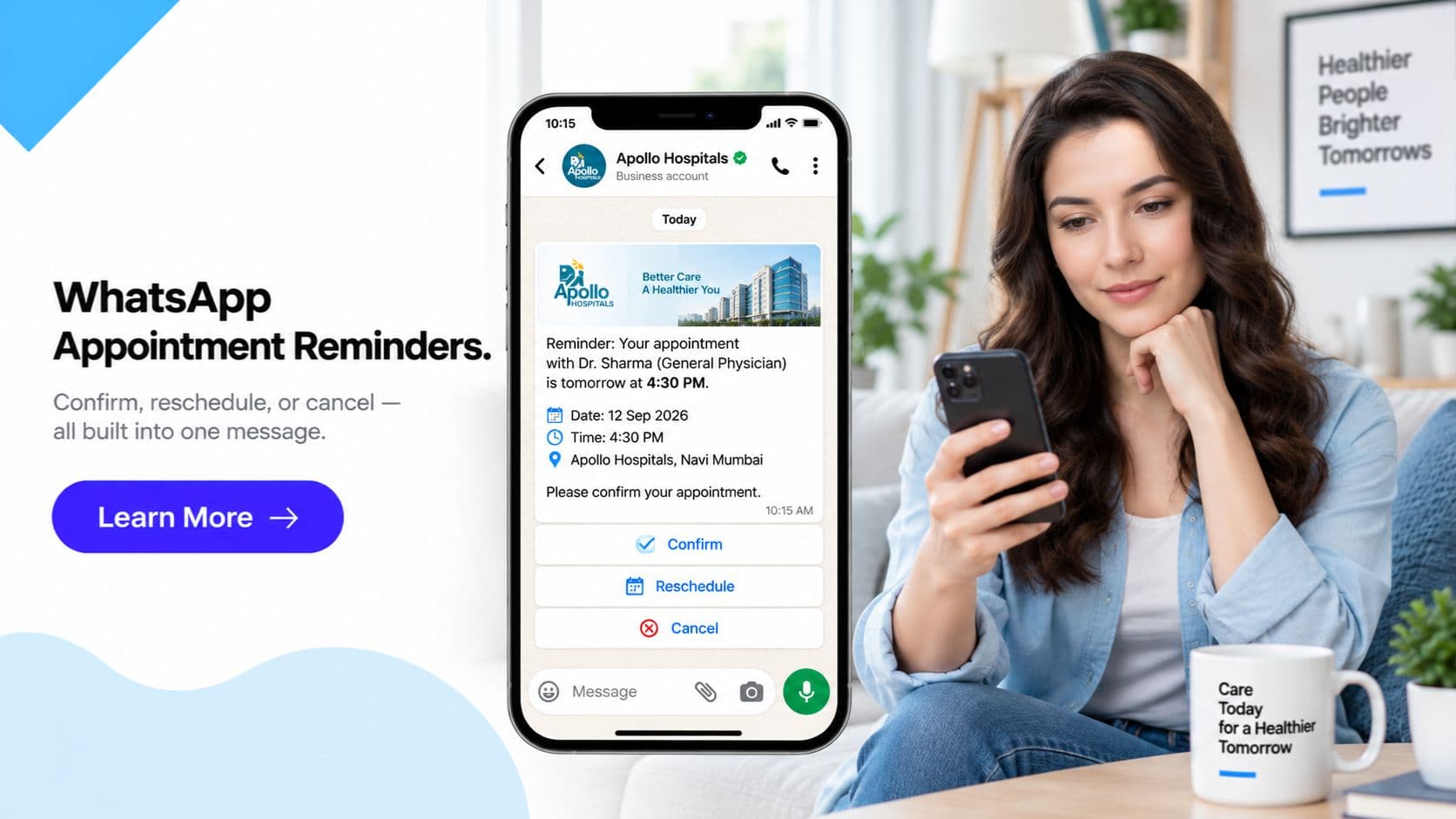
WhatsApp changes the mechanics of that decision. The reminder arrives as a rich message with the appointment date, time, location or doctor/stylist name, and a map link, plus three buttons that let the customer act in one tap- no call required. Get Click Media manages this setup end-to-end for Indian businesses, connecting appointment reminders to your existing WhatsApp Business API account and your booking system.
For businesses already running high appointment volumes- hospitals, diagnostic labs, salons, gyms, service centers- this is one of the highest-return automations available on WhatsApp, because it directly protects revenue that is otherwise lost to empty, unfilled time slots.
Set Up WhatsApp Appointment Reminders with Get Click Media- Official Meta BSP · Confirm/Reschedule/Cancel buttons · Go live in 5 days. Set Up Appointment Reminders · Request a Demo · See WhatsApp API Pricing
What Are WhatsApp Appointment Reminders?
WhatsApp appointment reminders are interactive WhatsApp Business API template messages sent around a booked appointment, carrying the appointment details plus a row of quick-reply buttons- typically Confirm, Reschedule, and Cancel. The customer does not need to type anything or call anyone; tapping a button sends a structured response back to your business instantly.
This differs fundamentally from an SMS reminder, which is a one-way, read-only text, or a phone call, which requires two people to be available at the same time. A WhatsApp reminder is two-way by design: the message itself is the interface for taking action.
Behind a single reminder message sits a three-touch sequence, not a one-off text. A customer typically receives a confirmation the moment they book, a reminder roughly 48 hours before the appointment giving them time to reschedule if their plans change, and a final day-of reminder a few hours before the slot with the exact time, location, and a map link. Each message in the sequence carries the same Confirm/Reschedule/Cancel buttons, so the customer can act at any point in the journey, not just at the very end.
The mechanic works because it removes every point of friction between "I need to change this appointment" and the appointment actually being changed. Tapping Reschedule can open a date/time picker via a WhatsApp chatbot flow or WhatsApp Flows, letting the customer pick a new slot in seconds, with the change syncing back to your booking system automatically.
The Appointment Reminder Sequence- Step by Step
- Booking created in your source system. A patient books an OPD slot, a customer books a salon appointment, or a service center schedules a car drop-off- in your HMS, salon booking software, or service CRM. This event is the trigger for the entire WhatsApp sequence; nothing needs to be done manually.
- Immediate booking confirmation. Within seconds of the booking, a WhatsApp Utility template is sent confirming the date, time, and provider (doctor, stylist, technician), along with Confirm and Reschedule buttons. This closes the loop immediately- the customer knows the booking went through and has their details in writing, in a thread they can scroll back to anytime.
- 48-hour reminder. Roughly two days before the appointment, a second reminder goes out with the same details plus Confirm/Reschedule/Cancel buttons. This window is deliberately wide- if the customer's plans have changed, there is still enough time for the freed-up slot to be filled by someone else, rather than discovering the cancellation on the appointment day itself.
- Day-of reminder. A few hours before the scheduled time, a final reminder is sent with the exact time, a map or location link, any last preparation instructions (fasting for a blood test, arriving 10 minutes early), and the same button set. This is the message most directly responsible for reducing walk-away no-shows, since it lands when the appointment is genuinely top-of-mind.
- Reschedule or cancel handling. A Reschedule tap opens a date/time picker flow- via WhatsApp Flows or a short chatbot conversation- and the new slot is written back to the booking system automatically. A Cancel tap frees the slot immediately and can trigger a quick one-tap reason capture, turning a lost booking into a data point rather than a mystery gap in the calendar.
- Post-appointment follow-up (optional). After the appointment is marked complete in the source system, an optional follow-up message can request a quick rating, share aftercare instructions, or prompt the next booking- useful for recurring appointments like physiotherapy sessions, salon visits, or AMC service check-ups.
WhatsApp Appointment Reminders vs Phone/SMS Reminders
| Factor | Phone call reminder | SMS reminder | WhatsApp appointment reminder |
|---|---|---|---|
| Typical no-show rate | 25-45% (staff-dependent) | 25-40% | Reduced by roughly 30-40% vs call/SMS-only |
| Message open/answer rate | Depends on answer rate, often 40-60% | ~90-95% delivered, read rate unclear | Near-98% open rate |
| Reschedule action | Requires a live call during business hours | Customer must call back separately | One-tap Reschedule button, no call needed |
| Cancel action | Requires a live call | Customer must call back separately | One-tap Cancel button, instant slot release |
| Staff time per reminder | 2-5 minutes per call | Near-zero, but no two-way action | Near-zero, fully automated |
| Cost per reminder | High- staff time plus call charges | Low, but no interaction possible | Low, with interactive buttons included |
| Rich content (map, doctor name, image) | Not possible verbally | Very limited by character count | Full rich message with map link, name, notes |
| Multi-touch sequence (confirm + 2 reminders) | Rarely done- too staff-intensive | Sometimes done, but read-only | Standard 3-touch sequence, fully automated |
| Sync with booking/scheduling system | Manual, staff must check calendar | Manual or semi-automated | Automatic via webhook integration |
| Customer experience | Can feel intrusive, timing-dependent | Passive, easy to miss or ignore | Familiar app, acted on immediately |
| Works for reschedule during off-hours | No- limited to business hours | No live interaction possible | Yes- Reschedule flow works 24/7 |
| Data captured on cancellation | Only if staff asks and logs it | None | Optional one-tap reason capture |
| Consent and compliance | Standard telecom consent (TRAI/DND) | DLT registration required (TRAI) | DPDP-aligned opt-in, Utility template category |
| Scales with appointment volume | Does not scale- needs more staff | Scales, but no automation on replies | Scales fully- same setup handles 50 or 50,000 appointments |
WhatsApp Appointment Reminders- 6 Indian Business Types
1. Hospital OPD Appointments
A multi-specialty hospital books 200+ OPD slots a day across departments. Each booking triggers an immediate confirmation with the doctor's name, department, and slot time, followed by a 48-hour reminder and a day-of reminder with the OPD room number and a hospital map link. Patients who need to reschedule tap the button instead of calling the hospital's often-busy reception line. Result: OPD no-show rate reduced by roughly 35%, freeing consultation slots for waiting patients.
2. Dental and Diagnostic Clinics
A dental clinic or diagnostic lab sends a confirmation with any pre-appointment instructions (fasting before a blood test, arriving early for X-rays), a 48-hour reminder, and a day-of reminder with the exact address. Patients who need to shift a slot reschedule directly rather than forgetting until the appointment time has already passed. Result: pre-appointment instruction compliance improves, cutting repeat-visit rates for incomplete prep by a significant margin.
3. Salon and Spa Bookings
A salon booking a bridal package, haircut, or spa slot sends a confirmation with the stylist's name and service duration, a day-before reminder, and a same-day reminder two hours ahead. A Reschedule tap opens the salon's available slots for that week directly in WhatsApp, integrated with the salon's booking system. Result: last-minute no-shows for premium slots (bridal, spa packages) drop sharply, protecting high-value bookings.
4. Gym and Fitness Class Bookings
A gym running limited-capacity classes (HIIT, yoga, personal training slots) sends a class booking confirmation, a reminder the evening before, and a same-day reminder an hour ahead. A Cancel tap immediately frees the slot for someone on the waitlist, and the chatbot can auto-notify the next person in line. Result: class capacity utilisation improves meaningfully as freed slots get filled same-day instead of sitting empty.
5. Auto Service Center Bookings
A car service center confirms a drop-off slot, sends a reminder the day before with pickup/drop options and estimated service duration, and a day-of reminder confirming the service bay is ready. Customers who need to shift a drop-off- common when work schedules change last-minute- reschedule with one tap instead of simply not showing up. Result: service bay idle time drops, improving daily vehicle throughput at the center.
6. Home-Service Technician Visits
An appliance repair or home-service company (AC service, plumbing, pest control) confirms a technician visit window, sends a reminder with the technician's name and estimated arrival time, and a day-of update as the technician is en route. Customers reschedule directly if they are not going to be home, saving a wasted technician trip. Result: wasted "customer not available" technician visits fall substantially, improving technician utilisation per day.
Frequently Asked Questions- WhatsApp Appointment Reminders
How do WhatsApp appointment reminders reduce no-shows? WhatsApp appointment reminders combine a near-98% open rate with one-tap Confirm, Reschedule, and Cancel buttons built into the message itself. Instead of the customer forgetting a phone call or ignoring an SMS, they see the appointment details and can act immediately from the notification screen. This typically cuts no-show rates by roughly 30-40% compared to voice-call-only or SMS-only reminder workflows, since rescheduling no longer requires calling the front desk during business hours.
What is the typical WhatsApp appointment reminder sequence? The standard sequence has three touches: an immediate booking confirmation sent the moment the appointment is created, a reminder sent roughly 48 hours before the appointment giving the customer time to reschedule if needed, and a day-of reminder sent a few hours before the slot with the final details and a map or location link. Some businesses add a fourth, post-appointment follow-up message for feedback or the next booking.
Can customers reschedule an appointment directly from WhatsApp? Yes. Tapping Reschedule on the reminder message opens a date and time picker- either through a WhatsApp Flow or a short chatbot conversation- so the customer picks a new slot without calling anyone. The updated appointment syncs back to your booking or scheduling system automatically, and front-desk staff are freed from handling routine reschedule calls.
Does this integrate with our existing hospital or salon booking software? Yes. WhatsApp appointment reminders connect to your existing system- a hospital management system (HMS), salon booking software, or service-center CRM- via webhook. When an appointment is created, updated, or cancelled in your source system, it automatically triggers the corresponding WhatsApp template message. Get Click Media handles this integration as part of setup, so your staff keep using the booking system they already know.
Are appointment reminders sent as Marketing or Utility messages? Appointment reminders are typically sent as Utility-category WhatsApp templates, not Marketing, because they relate to an existing, already-booked appointment rather than promoting a new purchase. Utility templates have different approval rules and pricing than Marketing templates. Get Click Media structures your reminder templates correctly during setup so they are approved and billed as Utility messages.
Is patient and customer data safe under India's DPDP Act? Yes, when set up correctly. Appointment data- name, phone number, appointment details- falls under India's DPDP Act 2023, and opt-in consent is required before sending WhatsApp messages, the same as any other WhatsApp business communication. Get Click Media builds consent capture into the booking flow itself, so patients and customers opt in when they first book, and reminders are sent only to numbers that have consented.
How long does it take to set up WhatsApp appointment reminders? Most businesses go live within 5 days. This includes WhatsApp Business API and template approval, webhook integration with your existing booking or scheduling system, and configuration of the confirmation, 48-hour, and day-of reminder templates. Get Click Media manages the entire setup end-to-end, including Meta's template review process.
What happens if a customer taps Cancel on a reminder? A Cancel tap immediately updates the appointment status in your connected booking system and frees up that slot for another customer. Depending on your configuration, the chatbot can also ask a quick one-tap reason (schedule conflict, no longer needed, etc.) and offer to rebook for a later date, turning a cancellation into a retained customer rather than a lost one.
Get Started
WhatsApp appointment reminders turn a passive text into a two-way action point- customers confirm, reschedule, or cancel without a single phone call, and your booking calendar stays accurate in real time. For industry-specific setups, see our deep dives on WhatsApp API for healthcare and WhatsApp API for salons and spas, or explore how a WhatsApp chatbot can handle the full reschedule flow without any staff involvement.
Set Up WhatsApp Appointment Reminders with Get Click Media- Official Meta BSP · Confirm/Reschedule/Cancel buttons · Go live in 5 days. Set Up Appointment Reminders · Request a Demo · See WhatsApp API Pricing
Article topics
Frequently Asked Questions
How do WhatsApp appointment reminders reduce no-shows?
WhatsApp appointment reminders combine a near-98% open rate with one-tap Confirm, Reschedule, and Cancel buttons built into the message itself. Instead of the customer forgetting a phone call or ignoring an SMS, they see the appointment details and can act immediately from the notification screen. This typically cuts no-show rates by roughly 30-40% compared to voice-call-only or SMS-only reminder workflows, since rescheduling no longer requires calling the front desk during business hours.
What is the typical WhatsApp appointment reminder sequence?
The standard sequence has three touches: an immediate booking confirmation sent the moment the appointment is created, a reminder sent roughly 48 hours before the appointment giving the customer time to reschedule if needed, and a day-of reminder sent a few hours before the slot with the final details and a map or location link. Some businesses add a fourth, post-appointment follow-up message for feedback or the next booking.
Can customers reschedule an appointment directly from WhatsApp?
Yes. Tapping Reschedule on the reminder message opens a date and time picker- either through a WhatsApp Flow or a short chatbot conversation- so the customer picks a new slot without calling anyone. The updated appointment syncs back to your booking or scheduling system automatically, and front-desk staff are freed from handling routine reschedule calls.
Does this integrate with our existing hospital or salon booking software?
Yes. WhatsApp appointment reminders connect to your existing system- a hospital management system (HMS), salon booking software, or service-center CRM- via webhook. When an appointment is created, updated, or cancelled in your source system, it automatically triggers the corresponding WhatsApp template message. Get Click Media handles this integration as part of setup, so your staff keep using the booking system they already know.
Are appointment reminders sent as Marketing or Utility messages?
Appointment reminders are typically sent as Utility-category WhatsApp templates, not Marketing, because they relate to an existing, already-booked appointment rather than promoting a new purchase. Utility templates have different approval rules and pricing than Marketing templates. Get Click Media structures your reminder templates correctly during setup so they are approved and billed as Utility messages.
Is patient and customer data safe under India's DPDP Act?
Yes, when set up correctly. Appointment data- name, phone number, appointment details- falls under India's DPDP Act 2023, and opt-in consent is required before sending WhatsApp messages, the same as any other WhatsApp business communication. Get Click Media builds consent capture into the booking flow itself, so patients and customers opt in when they first book, and reminders are sent only to numbers that have consented.
How long does it take to set up WhatsApp appointment reminders?
Most businesses go live within 5 days. This includes WhatsApp Business API and template approval, webhook integration with your existing booking or scheduling system, and configuration of the confirmation, 48-hour, and day-of reminder templates. Get Click Media manages the entire setup end-to-end, including Meta's template review process.
What happens if a customer taps Cancel on a reminder?
A Cancel tap immediately updates the appointment status in your connected booking system and frees up that slot for another customer. Depending on your configuration, the chatbot can also ask a quick one-tap reason (schedule conflict, no longer needed, etc.) and offer to rebook for a later date, turning a cancellation into a retained customer rather than a lost one.
About the author
Get Click Media creates practical resources for businesses using messaging, automation, analytics, and digital communication to improve customer engagement. This article was published on .