
In this article
Explore the key concepts, practical considerations, and frequently asked questions related to whatsapp analytics.
Key takeaways
- WhatsApp tracks four layers SMS can't- message-level read receipts, per-template button click-through rates, spend by conversation category, and full-funnel campaign conversion.
- Real-time webhooks report delivered (grey tick) and read (blue tick) status on every message, something SMS delivery reports have no equivalent for.
- A retail chain case study found Authentication (OTP) conversations eating 40% of WhatsApp spend, and reallocating that budget lifted Marketing volume by 28%.
Every WhatsApp message a business sends generates a trail of events- sent, delivered, read, clicked, sometimes converted. WhatsApp analytics is the practice of capturing that trail and turning it into decisions: which template to scale, which chatbot step is losing customers, and which conversation category is eating your budget. For a business sending a few hundred messages a month, eyeballing individual chats is enough. For a business running WhatsApp Business API at scale- thousands or lakhs of conversations- it is not.
Indian businesses adopting WhatsApp for marketing, support, and transactional messaging are used to SMS-era reporting: a delivery report and not much else. WhatsApp's analytics stack goes considerably deeper- real-time read receipts, per-template click-through rates, spend broken down by conversation category, and full-funnel campaign dashboards that track a message from send through to a completed sale. That depth is one of the strongest structural arguments for WhatsApp over SMS, covered in more detail in our WhatsApp vs SMS comparison.
The catch is that this data is scattered by default- delivery/read events arrive as webhooks, template metrics sit in Meta's dashboard, conversation-category spend is buried in your billing statement, and chatbot performance lives in whatever platform runs your WhatsApp chatbot. Get Click Media's platform pulls all four layers into a single unified dashboard, so a campaign manager or support lead can see delivery, engagement, spend, and chatbot performance without switching between four different views.
This post covers exactly what WhatsApp analytics tracks, how the tracking works end to end, how it compares to SMS delivery reports, and where it makes a measurable difference across common Indian business use cases.
Get WhatsApp Analytics with Get Click Media- Official Meta BSP · Delivery/read tracking + campaign dashboard · Go live in 5 days. See Your WhatsApp Analytics · Request a Demo · See WhatsApp API Pricing
What Does WhatsApp Analytics Cover?
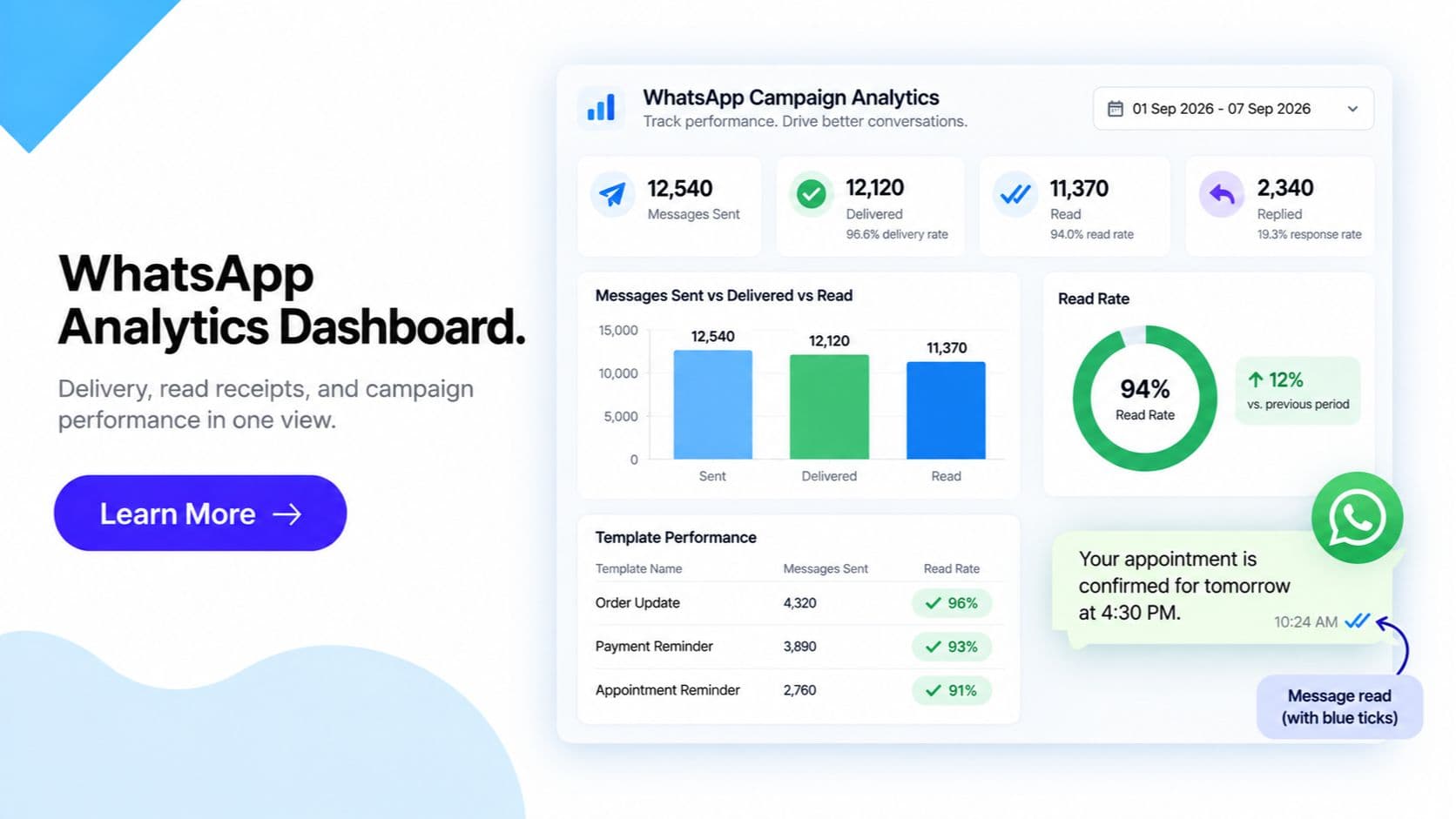
WhatsApp analytics is not one metric- it is four layers that answer four different questions, from the individual message up to the entire campaign.
Message-level receipts. Every message you send moves through a status lifecycle- sent → delivered (double grey tick) → read (double blue tick)- and each transition is pushed to you as a real-time webhook event. This is the finest-grained layer: it tells you exactly how many recipients received a specific message and how many opened it, and roughly when.
Template-level performance. For every approved message template, Meta and BSP dashboards report sent count, delivered rate, read rate, and- for templates with quick-reply or call-to-action buttons- click-through rate on each individual button. This is the layer you use to A/B test template wording, button copy, and structure before committing budget to a large send.
Conversation-category analytics. WhatsApp bills conversations under four categories- Marketing, Utility, Authentication, and Service- each with its own pricing. A proper analytics dashboard breaks down both spend and message volume by category, so a business can see precisely where its messaging budget is going rather than facing one lump billing number at month end.
Campaign-level dashboard. For broadcast and marketing sends, a unified view rolls the above layers up into one screen- recipients targeted, delivered, read, clicked, and, with e-commerce or CRM integration, converted. This is full-funnel tracking from send to sale, not just an open-and-click count.
Chatbot analytics. For businesses running a WhatsApp chatbot, a fifth layer tracks conversation completion rate, drop-off points within the flow, escalation-to-human rate, and average resolution time- the metrics you tune a bot's decision tree against.
Because delivery, read, and click events arrive as real-time webhooks, all of this can be piped into a business's own CRM or BI tool- via Get Click Media's platform or a custom webhook consumer- rather than being locked inside a single vendor dashboard.
How WhatsApp Message Tracking Works- Step by Step
- Message sent. Your business sends a message via WhatsApp Business API- a template message, a session message, or a chatbot reply. The message is queued and dispatched to Meta's servers, and a message ID is generated for tracking.
- Delivered webhook fires. Once the message reaches the recipient's device, WhatsApp sends a "delivered" status webhook to your configured endpoint (or your BSP dashboard). This is the equivalent of the double grey tick in the customer's chat window.
- Read webhook fires. If the recipient opens the chat and views the message- and has not disabled read receipts- a "read" status webhook fires, corresponding to the double blue tick. This event is what makes WhatsApp's open-rate tracking possible in the first place, something SMS has no equivalent for.
- Click event captured, if the message has a button. If the template includes a quick-reply or call-to-action button and the customer taps it, a click event is recorded against that specific button, feeding directly into the template's click-through rate.
- Conversion event recorded, if CRM/e-commerce linked. Where the business has connected its CRM or e-commerce platform, a subsequent action- a completed purchase, a booked appointment, a submitted form- is matched back to the original message, closing the loop from send to outcome.
- Dashboard aggregation. All of the above events- across every message, template, and campaign- are aggregated in real time into the unified dashboard: per-message status, per-template performance, per-category spend, and per-campaign funnel metrics, viewable on demand rather than compiled manually.
WhatsApp Analytics vs SMS Delivery Reports
| Metric | WhatsApp Analytics | SMS Delivery Report |
|---|---|---|
| Delivery confirmation | Yes- real-time webhook | Yes- delivery report |
| Read receipt | Yes- double blue tick, real-time | No- not technically possible |
| Click tracking | Native- per template button | Only via a separate link shortener |
| Conversion tracking | Yes- with CRM/e-commerce integration | Not native- requires external attribution |
| Template A/B insight | Yes- per-variant sent/delivered/read/click | No template concept- static text only |
| Chatbot funnel visibility | Yes- completion rate, drop-off, escalation | Not applicable- SMS has no native chatbot layer |
| Cost breakdown by category | Yes- Marketing/Utility/Authentication/Service | Single flat per-SMS rate, no category split |
| Multi-agent/team performance | Yes- via inbox and CRM integration | Not tracked natively |
| Real-time webhook access | Yes | Limited- provider-dependent, often batched |
| Time-to-read data | Yes- timestamp on read event | Not available |
| Data granularity | Per-message, per-template, per-campaign | Per-message only |
| Export to external BI/CRM | Yes- via webhook or API | Provider-dependent, usually CSV export only |
The practical takeaway: SMS tells you a message reached a handset. WhatsApp tells you whether it reached the handset, whether it was opened, whether the customer engaged with it, and- when connected to your CRM- whether it resulted in a sale. Our WhatsApp vs SMS comparison covers this gap in the wider context of choosing a channel, not just the reporting layer.
WhatsApp Analytics- 6 Use Cases for Indian Businesses
1. E-commerce- Campaign ROI Tracking
A D2C brand runs a weekend sale broadcast to 50,000 opted-in customers. The campaign dashboard shows recipients targeted, delivered, read, clicked on the "Shop Now" button, and- via the Shopify integration- actual purchases completed from that click. Instead of guessing whether the campaign worked, the marketing team sees exact send-to-sale ROI. Result: campaign ROI visibility improves budget reallocation across future sends by up to 3x more accurately than open-rate guesswork alone.
2. Chatbot Flow Optimisation
A support team notices via chatbot analytics that 40% of customers drop off at the "select order number" step of a returns flow. Reviewing the drop-off point, they identify that customers don't have their order number handy and redesign the step to accept a phone number lookup instead. Result: chatbot flow completion rate improves from 58% to 81% after the fix.
3. Template A/B Testing for a Bank or NBFC
An NBFC tests two variants of a loan-offer Utility template- one with a single CTA button, one with two (Apply Now / Talk to an Agent)- sending each to a matched sample of customers. Template-level analytics show delivered rate, read rate, and click-through per button for each variant. Result: the two-button variant shows a 22% higher click-through rate, and is scaled to the full customer base.
4. Support Team Performance Monitoring
A customer service head uses escalation-to-human rate and average resolution time from chatbot analytics to compare performance across shifts and agent teams, identifying that the night shift has a markedly higher escalation rate due to a gap in the bot's after-hours FAQ coverage. Result: after-hours escalation rate drops by 34% once the FAQ gap is closed.
5. Marketing Budget Allocation Across Conversation Categories
A retail chain reviews its monthly conversation-category breakdown and discovers that Authentication (OTP) conversations, triggered by app logins, are consuming 40% of total WhatsApp spend- far more than the planned Marketing allocation. The finance team renegotiates OTP volume with the app team and reallocates the freed budget to Marketing campaigns. Result: Marketing conversation volume increases by 28% within the same overall monthly spend.
6. Multi-Location Franchise Performance Comparison
A franchise business with 40 outlets uses per-campaign and per-template dashboards, segmented by location tag, to compare read rates and conversion across cities. Two underperforming outlets are found to be sending templates in English to a Hindi-preferring customer base. Result: switching template language for those outlets lifts read rate by 19 percentage points.
Frequently Asked Questions- WhatsApp Analytics
What can I actually track with WhatsApp analytics? Four layers: message-level delivery and read receipts (sent, delivered, read, and button clicks) via real-time webhooks; template-level performance (sent count, delivered rate, read rate, click-through rate per button) so you can A/B test wording; conversation-category analytics that break down spend and volume across Marketing, Utility, Authentication, and Service; and campaign-level dashboards showing recipients targeted, delivered, read, clicked, and- with CRM integration- converted. Chatbot flows add completion rate, drop-off points, and escalation-to-human rate.
How is WhatsApp read receipt tracking different from SMS? WhatsApp delivers real-time webhook events for sent, delivered (double grey tick), and read (double blue tick) status on every message- so you know exactly how many recipients opened it. SMS only gives you a delivery report confirming the message reached the handset; there is no read receipt and no native click tracking unless you bolt on a separate link shortener. This is a structural difference, not a feature gap you can close with SMS.
Can I see click-through rate on WhatsApp template buttons? Yes. For any approved message template with quick-reply or call-to-action buttons, Meta and BSP dashboards report click-through rate on each individual button alongside sent, delivered, and read rates. This lets you A/B test two template variants- different wording, different button copy, different CTA order- and pick the one with the higher click-through rate before scaling a campaign.
What is conversation-category analytics and why does it matter for budget? WhatsApp bills every conversation under one of four categories- Marketing, Utility, Authentication, or Service- each priced differently. A good analytics dashboard breaks down both spend and message volume by category, so you can see exactly where your messaging budget is going- for example, discovering that OTP-triggered Authentication conversations are consuming a disproportionate share of spend versus planned Marketing campaigns- and reallocate accordingly.
Does WhatsApp analytics track full-funnel conversion, not just opens and clicks? For broadcast and marketing campaigns, yes- with CRM or e-commerce integration. The campaign dashboard shows recipients targeted, delivered, read, clicked, and converted (i.e. the customer completed a purchase or the intended action), giving you send-to-sale visibility in one view. Without a CRM/e-commerce link, you still get targeted, delivered, read, and clicked, which already goes further than SMS delivery reports.
Can I pull WhatsApp analytics into my own CRM or BI tool instead of a vendor dashboard? Yes. Because delivery, read, and click events arrive as real-time webhooks, you can pipe them directly into your own CRM or BI tool rather than relying solely on a vendor's dashboard view. Get Click Media's platform supports both- a built-in unified dashboard for teams that want it ready-made, and raw webhook access for teams that want to build custom reporting.
What chatbot-specific analytics are available on WhatsApp? Chatbot analytics cover conversation completion rate (did the customer reach the intended end state), drop-off points (which step in the flow customers abandon most), escalation-to-human rate (how often the bot hands off to a live agent), and average resolution time. These metrics are what you tune a chatbot flow against- a high drop-off at a specific step usually points to a confusing menu option or a missing response path.
Does WhatsApp analytics expose the actual content of customer messages? No. Aggregate reporting- counts, rates, and category-level breakdowns- is standard in WhatsApp analytics dashboards. Individual message content is not typically exposed in analytics beyond metadata (status, timestamp, category, template used). This is consistent with DPDP 2023, which governs how customer interaction data is collected, used, and reported on by Indian businesses.
Get Started
WhatsApp analytics turns a channel you're already using for marketing, broadcast, and chatbot conversations into one you can actually measure and optimise- delivery and read receipts on every message, click-through on every template button, spend broken down by conversation category, and a full-funnel view of every campaign. Paired with WhatsApp Business API and a well-tuned chatbot, it's the difference between guessing what worked and knowing exactly what to scale next.
Get WhatsApp Analytics with Get Click Media- Official Meta BSP · Delivery/read tracking + campaign dashboard · Go live in 5 days. See Your WhatsApp Analytics · Request a Demo · See WhatsApp API Pricing
Article topics
Frequently Asked Questions
What can I actually track with WhatsApp analytics?
Four layers: message-level delivery and read receipts (sent, delivered, read, and button clicks) via real-time webhooks; template-level performance (sent count, delivered rate, read rate, click-through rate per button) so you can A/B test wording; conversation-category analytics that break down spend and volume across Marketing, Utility, Authentication, and Service; and campaign-level dashboards showing recipients targeted, delivered, read, clicked, and- with CRM integration- converted. Chatbot flows add completion rate, drop-off points, and escalation-to-human rate.
How is WhatsApp read receipt tracking different from SMS?
WhatsApp delivers real-time webhook events for sent, delivered (double grey tick), and read (double blue tick) status on every message- so you know exactly how many recipients opened it. SMS only gives you a delivery report confirming the message reached the handset; there is no read receipt and no native click tracking unless you bolt on a separate link shortener. This is a structural difference, not a feature gap you can close with SMS.
Can I see click-through rate on WhatsApp template buttons?
Yes. For any approved message template with quick-reply or call-to-action buttons, Meta and BSP dashboards report click-through rate on each individual button alongside sent, delivered, and read rates. This lets you A/B test two template variants- different wording, different button copy, different CTA order- and pick the one with the higher click-through rate before scaling a campaign.
What is conversation-category analytics and why does it matter for budget?
WhatsApp bills every conversation under one of four categories- Marketing, Utility, Authentication, or Service- each priced differently. A good analytics dashboard breaks down both spend and message volume by category, so you can see exactly where your messaging budget is going- for example, discovering that OTP-triggered Authentication conversations are consuming a disproportionate share of spend versus planned Marketing campaigns- and reallocate accordingly.
Does WhatsApp analytics track full-funnel conversion, not just opens and clicks?
For broadcast and marketing campaigns, yes- with CRM or e-commerce integration. The campaign dashboard shows recipients targeted, delivered, read, clicked, and converted (i.e. the customer completed a purchase or the intended action), giving you send-to-sale visibility in one view. Without a CRM/e-commerce link, you still get targeted, delivered, read, and clicked, which already goes further than SMS delivery reports.
Can I pull WhatsApp analytics into my own CRM or BI tool instead of a vendor dashboard?
Yes. Because delivery, read, and click events arrive as real-time webhooks, you can pipe them directly into your own CRM or BI tool rather than relying solely on a vendor's dashboard view. Get Click Media's platform supports both- a built-in unified dashboard for teams that want it ready-made, and raw webhook access for teams that want to build custom reporting.
What chatbot-specific analytics are available on WhatsApp?
Chatbot analytics cover conversation completion rate (did the customer reach the intended end state), drop-off points (which step in the flow customers abandon most), escalation-to-human rate (how often the bot hands off to a live agent), and average resolution time. These metrics are what you tune a chatbot flow against- a high drop-off at a specific step usually points to a confusing menu option or a missing response path.
Does WhatsApp analytics expose the actual content of customer messages?
No. Aggregate reporting- counts, rates, and category-level breakdowns- is standard in WhatsApp analytics dashboards. Individual message content is not typically exposed in analytics beyond metadata (status, timestamp, category, template used). This is consistent with DPDP 2023, which governs how customer interaction data is collected, used, and reported on by Indian businesses.
About the author
Get Click Media creates practical resources for businesses using messaging, automation, analytics, and digital communication to improve customer engagement. This article was published on .