
In this article
Explore the key concepts, practical considerations, and frequently asked questions related to whatsapp catalog commerce: turning chats into checkouts.
Key takeaways
- WhatsApp Pay completes UPI payment without leaving the chat, but needs separate enablement- payment links via Razorpay, PayU, or CCAvenue are the universal fallback.
- The commerce journey runs seven steps- browse, cart, send cart, confirm total, payment link or Pay, pay, confirm- all inside one thread, no checkout page.
- D2C fashion brands saw checkout completion 2.1x higher than their mobile website, and jewellery sellers saw cart-to-payment conversion up 34%.
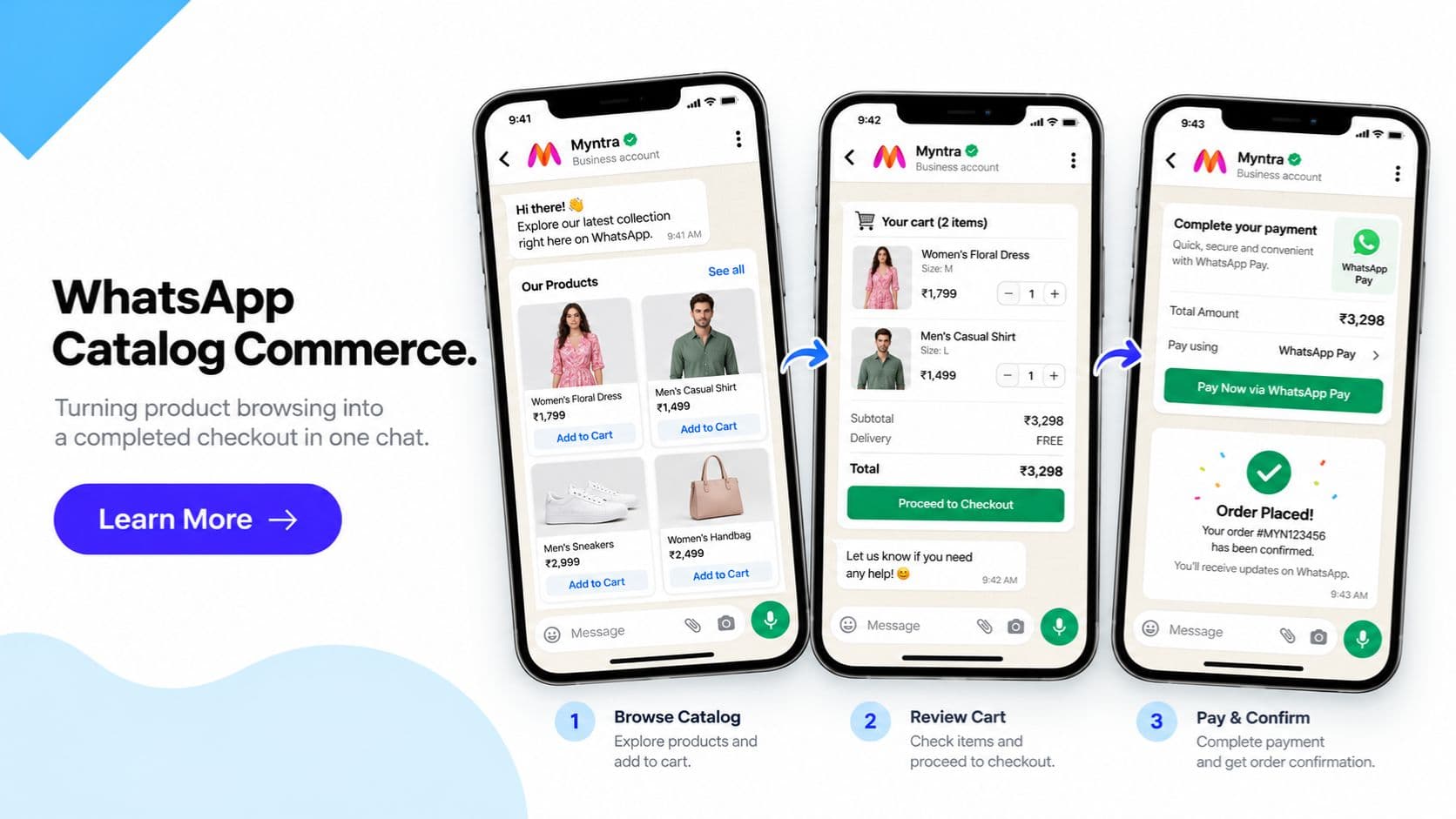
WhatsApp Catalog Commerce is what turns a chat into a checkout- a customer browses your product catalog, adds items to a WhatsApp cart, sends the cart to your business, gets the order and total confirmed, pays via a payment link or WhatsApp Pay, and receives order confirmation, all inside a single WhatsApp conversation thread. No website visit. No separate checkout page. No app switch between "I want this" and "I've paid for this."
This is different from- and builds directly on top of- the WhatsApp Catalog feature itself. That post covers the catalog-specific mechanics: product cards, multi-product carousels, collections, and catalog setup. If you haven't set up your catalog yet, start there- it's the catalog feature that powers this entire commerce journey. This post picks up from where a customer has already found your products and focuses on what happens next: cart, confirmation, and- most importantly- getting paid, without losing the customer somewhere between "add to cart" and "payment successful."
Every additional page load or app switch between browsing and payment is a point where an Indian mobile shopper can abandon the purchase. Sending a customer from a WhatsApp conversation to a separate website checkout page- re-entering their address, waiting for a slow mobile page to load, hunting for a payment option- is exactly the kind of friction that catalog commerce is designed to remove. Get Click Media builds this full flow end-to-end for Indian businesses: catalog integration, cart-to-order handling, and payment gateway or WhatsApp Pay integration, wired together as one continuous experience inside WhatsApp Business API.
For D2C brands, social-commerce sellers, and any business whose customers already trust WhatsApp more than a new website's checkout form, catalog commerce is often the difference between a browsed product and a completed sale.
Set Up WhatsApp Catalog Commerce with Get Click Media- Official Meta BSP · Catalog + cart + payment integration · Go live in 5 days. Set Up WhatsApp Commerce · Request a Demo · See WhatsApp API Pricing
What Is WhatsApp Catalog Commerce?
WhatsApp Catalog Commerce is the end-to-end conversational commerce journey that connects product discovery to a completed, paid order- all within one WhatsApp thread. It is not a separate Meta feature with its own name; it is the combination of three things working together: the WhatsApp Catalog (browsing and cart), your chatbot or agent handling order confirmation, and a payment integration (a gateway link or WhatsApp Pay) that closes the loop.
The distinction matters because catalog listing alone stops at "customer sent us their cart." Catalog commerce continues from there: confirming the order and total, generating and sending a payment link (or triggering WhatsApp Pay), tracking whether payment came through, sending a payment reminder if it hasn't, and finally sending order confirmation once it has. For a customer, the experience reads as one uninterrupted conversation- for the business, it's a structured, trackable order pipeline running entirely inside WhatsApp Business API.
This is particularly relevant for Indian e-commerce and retail businesses, where a large share of customers discover products via WhatsApp- through click-to-WhatsApp ads or a shared catalog link- and are far more likely to complete a purchase if they never have to leave the app they're already messaging you in.
For orders that need more than a chat reply can capture cleanly- a delivery address, a size or variant confirmation, a multi-field booking form- WhatsApp Flows adds a native in-chat form to this journey rather than relying on freeform text back and forth. And catalog commerce is also the foundation that WhatsApp AI agentic commerce builds on- where an AI agent handles the entire browse-to-buy conversation on the business's behalf rather than a scripted chatbot flow.
The WhatsApp Commerce Journey- Step by Step
- Customer browses the catalog. The journey starts the same way as any catalog interaction- the customer opens a shared catalog link, taps into individual product cards, or receives a multi-product carousel from your chatbot in response to a query. This is the discovery layer described in detail in the catalog feature guide.
- Customer adds items to the WhatsApp cart. Tapping "Add to Cart" on any product builds a running cart inside WhatsApp. The customer can keep browsing and add more items- sizes, quantities, and variants- before deciding they're done.
- Customer sends the cart to the business. A single tap sends the full cart as a structured order message to your WhatsApp number. Your chatbot receives itemised product data, quantities, and the cart subtotal- no manual re-entry required on either side.
- Business or chatbot confirms the order and total. The chatbot replies in the same thread with an order summary- items, quantities, delivery charges if any, and the final payable amount. This is the customer's chance to confirm or adjust before payment, reducing disputes later in the order.
- Payment link sent, or WhatsApp Pay triggered. For most businesses, the chatbot generates and sends a payment link scoped to that exact order total- via Razorpay, PayU, CCAvenue, or a UPI intent link. Where WhatsApp Pay is enabled, the business can skip the link entirely and let the customer complete UPI payment directly inside the chat.
- Customer completes payment. With a payment link, the customer taps through to the gateway's page, pays via UPI, card, or net banking, and is redirected back. With WhatsApp Pay, payment completes without leaving the thread at all- the most frictionless version of this step.
- Order confirmation sent in the same thread. Once the gateway or UPI rail confirms payment, the chatbot automatically sends an order confirmation message- order ID, amount paid, and expected delivery or service timeline- in the exact same conversation the customer started browsing in.
WhatsApp Catalog Commerce vs Website Checkout
| Factor | WhatsApp Catalog Commerce | Website Checkout |
|---|---|---|
| App switching required | None- browse, cart, and pay in one thread (payment link opens briefly, WhatsApp Pay avoids even that) | Customer leaves the chat/ad entirely for a separate site |
| Checkout steps | Cart → order confirmation → pay | Cart → account/guest checkout → address → shipping → payment |
| Account creation | Not required | Often required or strongly nudged |
| Address re-entry | Only if not already on file with the business | Manual entry almost every time, unless saved |
| Payment options | UPI (WhatsApp Pay or intent link), Razorpay, PayU, CCAvenue | Full gateway suite, typically more options |
| Mobile page load time | None- native WhatsApp UI | Depends on site optimisation; slow on weak connections |
| Cart abandonment risk | Lower- fewer steps, fewer page loads | Higher- each extra step is a drop-off point |
| Order status visibility | Same thread as the original conversation | Separate order tracking page or email |
| Payment reminder for unpaid cart | Automatic, in the same thread | Usually a separate abandoned-cart email/SMS |
| Best for | Impulse and repeat purchases, chat-originated discovery | Complex configurable orders, large product comparisons |
| Setup effort for business | Catalog + chatbot + payment gateway integration | Full e-commerce storefront and checkout build |
| Trust factor for first-time buyers | High- customer already trusts the WhatsApp thread | Depends entirely on the site's design and reputation |
| Works well on feature phones/slow internet | Yes- WhatsApp is lighter than most sites | Often degraded on slow connections |
| Data collected at checkout | Only what the order needs, via the chatbot | Often more form fields than necessary |
WhatsApp Catalog Commerce- 6 Use Cases for Indian Businesses
1. D2C Fashion Brands
A customer clicks a WhatsApp ad, browses new arrivals, adds a kurta and a pair of earrings to cart, and sends it. The chatbot confirms sizes and total, sends a Razorpay link, and the customer pays without opening a browser. Order confirmation lands in the same thread within seconds of payment. Result: checkout completion rate 2.1x higher than the brand's mobile website checkout.
2. Jewellery- Gold & Silver
A customer builds a cart of two gold chains priced at the day's rate, sends it, and the chatbot confirms the exact making-charge-inclusive total before generating a payment link- important for a category where price precision matters. The customer pays via UPI intent link from inside the chat. Result: cart-to-payment conversion up 34% versus phone-call order confirmation followed by a separate payment request.
3. Restaurant & Food Ordering
A regular customer sends "usual order," the chatbot pre-fills a cart from their last order, confirms the total with delivery charge included, and triggers WhatsApp Pay for enabled outlets- payment completes in-chat in under 15 seconds, and the kitchen receives the confirmed order immediately. Result: order-to-kitchen time cut by 60% versus phone orders taking payment on delivery.
4. Electronics & Gadgets
A customer adds a phone and a case to cart after comparing specs via the catalog, sends the cart, and the chatbot confirms EMI eligibility alongside the total before sending a PayU link that supports card EMI. Result: average order value up 22% when EMI options are presented at the payment-link stage rather than left for the customer to find on a website.
5. Kirana / Grocery Repeat Orders
A repeat customer's weekly cart is pre-built by the chatbot from order history, sent for confirmation, and paid via a saved UPI intent link- the entire re-order, confirm, and pay cycle takes under a minute. Result: repeat purchase frequency increased from fortnightly to weekly, with 70% of repeat orders paid within 5 minutes of the cart being sent.
6. Beauty & Personal Care D2C
A first-time customer discovers a skincare bundle via an Instagram-to-WhatsApp click, builds a cart, and completes payment via a CCAvenue link shared alongside a discount code applied automatically to the order total. Result: first-time-buyer conversion rate 1.8x higher than the brand's standalone landing page checkout.
Frequently Asked Questions- WhatsApp Catalog Commerce
What is WhatsApp Catalog Commerce and how is it different from WhatsApp Catalog? WhatsApp Catalog is the product listing feature- browsing, product cards, and cart building inside WhatsApp. WhatsApp Catalog Commerce is the full journey built on top of it: browse the catalog, add to cart, send the cart, get the order and total confirmed, pay via a payment link or WhatsApp Pay, and receive order confirmation- all inside one WhatsApp conversation, with no separate checkout page required.
Can a customer complete full payment inside WhatsApp, or do they still need to leave the app? It depends on the payment method. With a payment link- Razorpay, PayU, CCAvenue, or a UPI intent link- the customer taps the link inside the chat, completes payment on the gateway's page, and returns to WhatsApp for order confirmation. With WhatsApp Pay, available in India for enabled businesses, the customer completes UPI payment without ever leaving the WhatsApp thread, making it the most frictionless version of the flow.
What is WhatsApp Pay and is it available for all businesses in India? WhatsApp Pay is Meta's in-chat UPI payment capability that lets a customer pay a business directly inside WhatsApp, without opening a separate app or webpage. It is available in India but requires specific enablement and is not automatically active on every WhatsApp Business API account. Where it isn't enabled, the payment-link approach via Razorpay, PayU, CCAvenue, or a UPI intent link remains the universally available fallback and works for any business.
What happens if a customer adds items to cart but doesn't pay? This is handled as part of the same order lifecycle inside WhatsApp. The chatbot can send a payment reminder in the same thread- typically within a defined window- nudging the customer to complete payment on the link already shared. Because the entire conversation, cart, and payment link stay in one thread, recovering an unpaid cart doesn't require a separate remarketing channel.
Which payment gateways integrate with WhatsApp catalog commerce? Get Click Media integrates WhatsApp catalog commerce with Razorpay, PayU, CCAvenue, and direct UPI intent links, alongside WhatsApp Pay where enabled. The chatbot generates a payment link scoped to the specific order and cart total, sends it in the same conversation as the order confirmation, and listens for the gateway's payment webhook to trigger the order-confirmation message automatically.
Is payment data safe when a customer pays via WhatsApp? Yes. WhatsApp itself does not store or process payment card data at any point in this flow. Payment happens on the linked gateway's PCI-compliant page or via the UPI rail- WhatsApp only carries the link and the resulting confirmation message. Standard PCI-DSS practices apply at the gateway level, and customer and order data handled by the chatbot is subject to DPDP Act 2023 requirements.
Does WhatsApp catalog commerce work with Shopify or WooCommerce order management? Yes. Orders placed via WhatsApp cart sync into your Shopify or WooCommerce order management system the same way a website order would, including payment status, order total, and customer details. This means WhatsApp becomes an additional order channel feeding your existing fulfilment and inventory workflow, rather than a separate system to manage.
How much does it cost to set up full WhatsApp catalog commerce with payment integration? Costs include WhatsApp Business API conversation charges, Get Click Media's platform fee for the chatbot and commerce module, and standard payment gateway transaction fees charged by Razorpay, PayU, or CCAvenue on each transaction. There is no additional Meta charge for the catalog or cart functionality itself. See our WhatsApp API pricing guide for a full breakdown.
Can WhatsApp Flows collect delivery and order details during catalog checkout? Yes. Where an order needs more structured input than a chat message can capture cleanly- delivery address, size/variant confirmation, or a multi-field booking form- WhatsApp Flows renders a native in-chat form instead of relying on freeform replies. It's a natural pairing with catalog commerce for orders that need that extra structured step before checkout.
Get Started
WhatsApp Catalog Commerce closes the loop that catalog listing alone leaves open- taking a customer from "I like this product" all the way to "I've paid for it," without a single app switch. If you haven't set up the catalog itself yet, start with WhatsApp Catalog; once that's live, Get Click Media wires up cart handling, order confirmation, and payment integration- gateway links or WhatsApp Pay- on top of it, tailored to your e-commerce or retail business built on WhatsApp Business API. For structured in-chat forms, see WhatsApp Flows- and for where this journey is headed next, see WhatsApp AI agentic commerce.
Set Up WhatsApp Catalog Commerce with Get Click Media- Official Meta BSP · Catalog + cart + payment integration · Go live in 5 days. Set Up WhatsApp Commerce · Request a Demo · See WhatsApp API Pricing
Article topics
Frequently Asked Questions
What is WhatsApp Catalog Commerce and how is it different from WhatsApp Catalog?
WhatsApp Catalog is the product listing feature- browsing, product cards, and cart building inside WhatsApp. WhatsApp Catalog Commerce is the full journey built on top of it: browse the catalog, add to cart, send the cart, get the order and total confirmed, pay via a payment link or WhatsApp Pay, and receive order confirmation- all inside one WhatsApp conversation, with no separate checkout page required.
Can a customer complete full payment inside WhatsApp, or do they still need to leave the app?
It depends on the payment method. With a payment link- Razorpay, PayU, CCAvenue, or a UPI intent link- the customer taps the link inside the chat, completes payment on the gateway's page, and returns to WhatsApp for order confirmation. With WhatsApp Pay, available in India for enabled businesses, the customer completes UPI payment without ever leaving the WhatsApp thread, making it the most frictionless version of the flow.
What is WhatsApp Pay and is it available for all businesses in India?
WhatsApp Pay is Meta's in-chat UPI payment capability that lets a customer pay a business directly inside WhatsApp, without opening a separate app or webpage. It is available in India but requires specific enablement and is not automatically active on every WhatsApp Business API account. Where it isn't enabled, the payment-link approach via Razorpay, PayU, CCAvenue, or a UPI intent link remains the universally available fallback and works for any business.
What happens if a customer adds items to cart but doesn't pay?
This is handled as part of the same order lifecycle inside WhatsApp. The chatbot can send a payment reminder in the same thread- typically within a defined window- nudging the customer to complete payment on the link already shared. Because the entire conversation, cart, and payment link stay in one thread, recovering an unpaid cart doesn't require a separate remarketing channel.
Which payment gateways integrate with WhatsApp catalog commerce?
Get Click Media integrates WhatsApp catalog commerce with Razorpay, PayU, CCAvenue, and direct UPI intent links, alongside WhatsApp Pay where enabled. The chatbot generates a payment link scoped to the specific order and cart total, sends it in the same conversation as the order confirmation, and listens for the gateway's payment webhook to trigger the order-confirmation message automatically.
Is payment data safe when a customer pays via WhatsApp?
Yes. WhatsApp itself does not store or process payment card data at any point in this flow. Payment happens on the linked gateway's PCI-compliant page or via the UPI rail- WhatsApp only carries the link and the resulting confirmation message. Standard PCI-DSS practices apply at the gateway level, and customer and order data handled by the chatbot is subject to DPDP Act 2023 requirements.
Does WhatsApp catalog commerce work with Shopify or WooCommerce order management?
Yes. Orders placed via WhatsApp cart sync into your Shopify or WooCommerce order management system the same way a website order would, including payment status, order total, and customer details. This means WhatsApp becomes an additional order channel feeding your existing fulfilment and inventory workflow, rather than a separate system to manage.
How much does it cost to set up full WhatsApp catalog commerce with payment integration?
Costs include WhatsApp Business API conversation charges, Get Click Media's platform fee for the chatbot and commerce module, and standard payment gateway transaction fees charged by Razorpay, PayU, or CCAvenue on each transaction. There is no additional Meta charge for the catalog or cart functionality itself. See our WhatsApp API pricing guide for a full breakdown.
Can WhatsApp Flows collect delivery and order details during catalog checkout?
Yes. Where an order needs more structured input than a chat message can capture cleanly- delivery address, size/variant confirmation, or a multi-field booking form- [WhatsApp Flows](/whatsapp-flows) renders a native in-chat form instead of relying on freeform replies. It's a natural pairing with catalog commerce for orders that need that extra structured step before checkout.
About the author
Get Click Media creates practical resources for businesses using messaging, automation, analytics, and digital communication to improve customer engagement. This article was published on and was last reviewed on .