
In this article
Explore the key concepts, practical considerations, and frequently asked questions related to whatsapp order tracking.
Key takeaways
- WISMO queries often make up 30-40% of post-purchase support volume in Indian e-commerce, and proactive status pushes pre-empt most of them.
- Delivery exceptions carry Reschedule Delivery and Update Address buttons that write straight back to the courier or OMS, skipping a support call.
- Order tracking requires WhatsApp Business API, not the free Business App, since these are template-based notifications sent before the customer messages first.
Every "Where is my order?" message a support team fields is a small failure of communication- the information existed, it just never reached the customer at the right moment. Across Indian e-commerce, WISMO (Where Is My Order) queries routinely make up 30-40% of post-purchase support volume, consuming agent time on a question that has a factual, automatable answer: check the courier's status feed and tell the customer.
WhatsApp order tracking closes that gap. Instead of a static tracking page the customer has to remember to visit, order status- confirmed, shipped, out for delivery, delivered- arrives as a WhatsApp message the moment it changes, with a "Track Order" button that opens live tracking directly. The customer never has to ask, because the update already reached them.
For Indian businesses, this matters more than in many other markets. WhatsApp is already the primary messaging app for most smartphone users, open far more often than email or a shopping app, and far more trusted than an SMS from an unfamiliar sender ID. A WhatsApp message from a recognisable business name, delivered into a thread the customer already checks daily, gets seen and read almost immediately- which is exactly the effect you want for time-sensitive delivery information.
Get Click Media builds the connective layer between your order management system or courier partner and WhatsApp Business API- consuming status webhooks, formatting them into templated WhatsApp messages, and firing them automatically at every status change, including delivery exceptions that need a customer response. The result is a tracking experience that feels proactive rather than something the customer has to chase, and a support queue that isn't clogged with a question your systems already knew the answer to.
Set Up WhatsApp Order Tracking with Get Click Media- Official Meta BSP · Courier + OMS webhook integration · Go live in 5 days. Set Up Order Tracking · Request a Demo · See WhatsApp API Pricing
What Is WhatsApp Order Tracking?
WhatsApp order tracking is an automated notification system that sends customers their order status- as a WhatsApp message- every time it changes, sourced directly from your order management system (OMS) or courier partner's tracking feed. Rather than customers pulling status by visiting a tracking page or app, status is pushed to them the moment it's available.
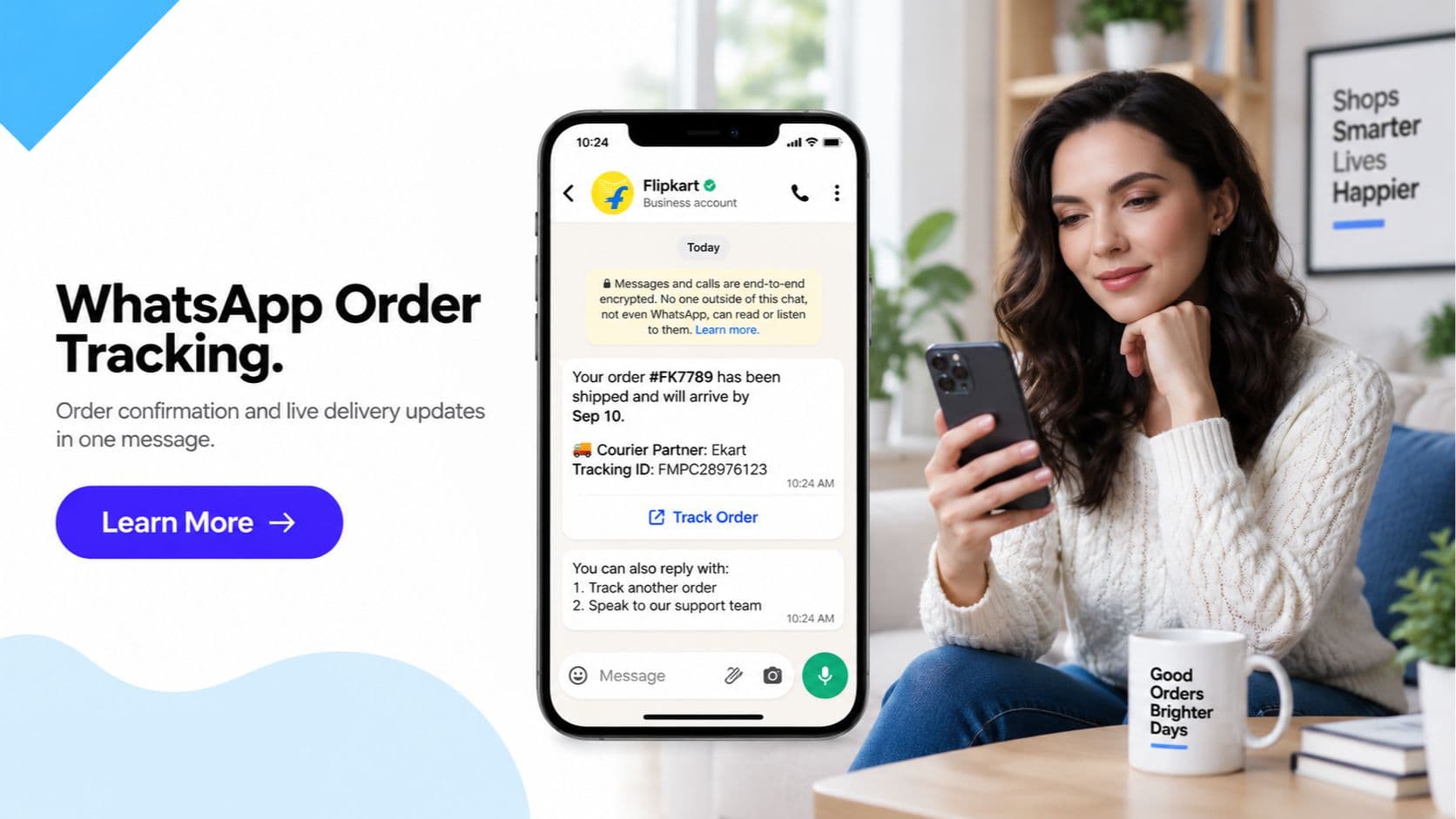
Each message is built as a WhatsApp template message (required for business-initiated notifications under WhatsApp Business API) and typically contains:
- The current status in plain language- "Your order has shipped," "Out for delivery today," "Delivered"
- The order ID or reference number
- The courier name handling the shipment
- The expected delivery date or delivery window
- A "Track Order" button that deep-links to a live tracking page showing real-time courier location/status
- On exceptions (delay, failed attempt), additional buttons such as "Reschedule Delivery" or "Update Address"
Because these arrive in the same WhatsApp thread the customer may already be using for order confirmation or customer service, tracking becomes part of one continuous conversation rather than a separate system the customer has to learn.
The Order Tracking Message Sequence- Step by Step
- Order confirmed. The moment an order is placed and payment is captured, the OMS fires a webhook and the customer receives a WhatsApp confirmation- order ID, items, amount, and expected delivery timeline. This message anchors the conversation thread that every later update will continue.
- Order shipped. When the OMS marks the order as dispatched (or the courier's manifest is generated), a WhatsApp update goes out with the courier name, the shipment/AWB number, and a "Track Order" button. This is typically the first moment a customer can see live movement of their parcel.
- Out for delivery. When the courier's tracking feed marks the shipment as out for delivery, a same-day WhatsApp update is sent with the expected delivery window, so the customer knows to expect the delivery person and doesn't need to guess or call the courier.
- Delivered. On successful delivery, a confirmation message closes the loop, often followed- in the same thread- by a review request, feedback prompt, or related-product recommendation while the purchase is still fresh in the customer's mind.
- Exception handling- delayed or failed attempt. If the courier's feed reports a delay or a failed delivery attempt, the customer gets an immediate WhatsApp message explaining the situation, with interactive buttons- "Reschedule Delivery" or "Update Address"- that open a short chatbot flow instead of requiring a call to customer support.
- Address/slot update pushed back to courier. Once the customer submits a new address or delivery slot through the chatbot flow, that data is pushed back to the OMS and courier system automatically, and a confirmation message closes the exception, resetting expectations for the next attempt.
WhatsApp Order Tracking vs SMS/Website-Only Tracking
| Aspect | WhatsApp Order Tracking | SMS Tracking | Website-Only Tracking Page |
|---|---|---|---|
| Delivery channel | Rich message in an app customers check constantly | Plain text, often filtered as spam | Customer must remember to visit and log in/search |
| Tracking access | One-tap "Track Order" button, deep-linked | Raw link pasted in text, easy to lose | Requires typing order ID/email manually |
| Order context | Order ID, courier, ETA shown in the message itself | Limited by 160-character segments | Available but requires navigation to find |
| Delivery exceptions | Interactive "Reschedule"/"Update Address" buttons | No action possible- customer must call support | Usually requires a support ticket or call |
| Read/open rates | Very high- WhatsApp is opened multiple times daily | Declining- often unread or auto-filtered | Depends entirely on customer initiative |
| Sender trust | Verified business name and profile visible | Unfamiliar or shared sender IDs, easily spoofed | N/A- customer-initiated visit |
| Proactive vs reactive | Proactive- pushed automatically at each status change | Proactive but limited in content | Reactive- customer must check |
| Post-delivery engagement | Same thread can trigger review/reorder prompts | Requires a separate SMS or email campaign | Requires a separate campaign |
| Cost per update | WhatsApp conversation-based pricing | Per-SMS cost, multiplies with segments | No per-message cost, but low engagement |
| Support ticket deflection | High- pre-empts most WISMO queries | Partial- text-only, less clarity | Low- customer often ends up contacting support anyway |
| Setup requirement | WhatsApp Business API + OMS/courier webhook integration | Bulk SMS gateway + DLT template registration | Tracking page/app already built |
| Rich media support | Order/courier details formatted clearly, buttons included | None | Yes, but only if the customer visits |
WhatsApp Order Tracking- 5 Use Cases for Indian Businesses
1. D2C Fashion & Apparel Brands
A customer orders a kurta set from a D2C fashion brand's website. WhatsApp confirms the order instantly, then sends a "Shipped" update with the courier name and tracking link the next day, an "Out for delivery" message on delivery day, and a "Delivered" confirmation with a review request that afternoon. No customer support interaction happens at any stage. Result: WISMO-related tickets down 35% within the first month.
2. Quick-Commerce & Grocery Delivery
For 10-30 minute grocery delivery, WhatsApp order tracking compresses to near real-time: order confirmed, rider assigned with name and live tracking, and delivered- all within a single short conversation thread. Because the delivery window is so tight, a live "Track Order" button matters more than in any other category, letting the customer watch the rider's progress instead of repeatedly opening the app. Result: repeat delivery-tracking app opens replaced almost entirely by WhatsApp thread checks.
3. Electronics & Appliances with Installation
For appliances requiring installation- refrigerators, ACs, washing machines- the tracking sequence extends beyond delivery: order confirmed, shipped, out for delivery, delivered, then a separate "Installation scheduled" message with a technician name and slot, sent through the same thread. Reschedule buttons let customers shift the installation slot without a call centre interaction. Result: installation-related support calls reduced by 40%.
4. Courier & 3PL Logistics Companies
Logistics and courier companies use WhatsApp order tracking as a white-label or co-branded notification layer for their retail clients, pushing shipment status updates on behalf of the brands they serve. Delivery exception handling- reschedule, address correction- is especially valuable here, since failed delivery attempts are one of the largest cost drivers in last-mile logistics. This pairs directly with WhatsApp API for logistics integrations. Result: failed delivery attempts cut by 25% after adding in-chat reschedule options.
5. Food Delivery & Restaurant Aggregators
For food orders, the tracking sequence compresses into minutes: order confirmed with estimated prep time, "Rider assigned" with a live tracking button, and "Delivered" with an instant feedback prompt. Because the entire order lifecycle happens in under an hour, WhatsApp's near-instant delivery and high open rate make it more reliable than SMS or in-app push notifications, which are often missed or delayed. Result: customer-initiated "where's my food" chats dropped by over 50%.
Frequently Asked Questions- WhatsApp Order Tracking
What is WhatsApp order tracking? WhatsApp order tracking sends customers automatic status updates- order confirmed, shipped, out for delivery, delivered- as WhatsApp messages instead of making them check a website or app. Each message includes the order ID, expected delivery date, courier name, and a "Track Order" button that deep-links to a live tracking page. Updates are triggered automatically by webhooks from your order management system or courier partner whenever the shipment status changes.
How does WhatsApp order tracking reduce 'Where is my order' support tickets? WISMO (Where Is My Order) queries are one of the largest categories of inbound e-commerce support volume, often 30-40% of post-purchase tickets. Proactive WhatsApp status pushes answer the question before the customer has to ask- confirming dispatch, giving an expected delivery window, and providing a live tracking link. Businesses that switch from passive tracking pages to proactive WhatsApp updates typically see a sharp drop in WISMO-related chats and calls.
Can customers reschedule a delivery or update their address on WhatsApp? Yes. When a delivery exception occurs- customer unavailable, incorrect address, failed attempt- the WhatsApp update can include in-chat action buttons such as "Reschedule Delivery" or "Update Address." Tapping these opens a short chatbot flow that captures the new slot or address and pushes it back to the courier or OMS automatically, without requiring a phone call to a support line.
How is WhatsApp order tracking different from SMS tracking updates? SMS delivers plain text only- no clickable tracking button, no rich order card, no images, and no way to take action like rescheduling within the message. WhatsApp order tracking includes a formatted message with the order ID, courier name, expected date, a live "Track Order" button, and- on delivery exceptions- interactive buttons to reschedule or update the address. SMS also has stricter character limits and is often filtered as spam by telecom operators.
What triggers each WhatsApp order tracking message? Each message is triggered by a webhook event from your order management system or courier's tracking API at the moment the shipment status changes: order confirmed, shipped, out for delivery, delivered, or an exception such as delayed or failed delivery attempt. Get Click Media integrates directly with your OMS and courier partners so updates fire automatically in real time, with no manual intervention needed from your operations team.
Can I send a review request or product recommendation after delivery? Yes. The delivered-status message can be configured to trigger a follow-up message in the same WhatsApp thread- a review or rating request, a reorder reminder, or a related-product recommendation. Because it continues the existing conversation thread, response rates are typically much higher than a separate email or SMS review request sent after the fact.
Do I need WhatsApp Business API to send order tracking updates? Yes. Order tracking messages are template-based notification messages sent to customers who have not necessarily messaged you first, which requires WhatsApp Business API access with pre-approved message templates. This is not available on the free WhatsApp Business App. Get Click Media, as an official Meta Business Solution Provider, handles the API setup, template approval, and courier/OMS webhook integration end to end.
How long does it take to set up WhatsApp order tracking? Most Indian businesses with a standard e-commerce or logistics stack- Shopify, WooCommerce, or a common OMS/courier combination- go live within 5 days. This includes WhatsApp Business API provisioning, message template approval from Meta, and webhook integration with your order management system and courier partner(s). Custom or legacy OMS integrations may take slightly longer depending on API availability.
Get Started
WhatsApp order tracking turns a passive tracking page into a proactive conversation- customers get status before they have to ask, exceptions get resolved with a tap instead of a call, and your support team stops fielding "where is my order" as a default ticket category. Paired with WhatsApp chatbot flows for exception handling and a WhatsApp catalog for the next purchase, it's a core piece of post-purchase experience for Indian e-commerce and logistics businesses.
Set Up WhatsApp Order Tracking with Get Click Media- Official Meta BSP · Courier + OMS webhook integration · Go live in 5 days. Set Up Order Tracking · Request a Demo · See WhatsApp API Pricing
Article topics
Frequently Asked Questions
What is WhatsApp order tracking?
WhatsApp order tracking sends customers automatic status updates- order confirmed, shipped, out for delivery, delivered- as WhatsApp messages instead of making them check a website or app. Each message includes the order ID, expected delivery date, courier name, and a 'Track Order' button that deep-links to a live tracking page. Updates are triggered automatically by webhooks from your order management system or courier partner whenever the shipment status changes.
How does WhatsApp order tracking reduce 'Where is my order' support tickets?
WISMO (Where Is My Order) queries are one of the largest categories of inbound e-commerce support volume, often 30-40% of post-purchase tickets. Proactive WhatsApp status pushes answer the question before the customer has to ask- confirming dispatch, giving an expected delivery window, and providing a live tracking link. Businesses that switch from passive tracking pages to proactive WhatsApp updates typically see a sharp drop in WISMO-related chats and calls.
Can customers reschedule a delivery or update their address on WhatsApp?
Yes. When a delivery exception occurs- customer unavailable, incorrect address, failed attempt- the WhatsApp update can include in-chat action buttons such as 'Reschedule Delivery' or 'Update Address.' Tapping these opens a short chatbot flow that captures the new slot or address and pushes it back to the courier or OMS automatically, without requiring a phone call to a support line.
How is WhatsApp order tracking different from SMS tracking updates?
SMS delivers plain text only- no clickable tracking button, no rich order card, no images, and no way to take action like rescheduling within the message. WhatsApp order tracking includes a formatted message with the order ID, courier name, expected date, a live 'Track Order' button, and- on delivery exceptions- interactive buttons to reschedule or update the address. SMS also has stricter character limits and is often filtered as spam by telecom operators.
What triggers each WhatsApp order tracking message?
Each message is triggered by a webhook event from your order management system or courier's tracking API at the moment the shipment status changes: order confirmed, shipped, out for delivery, delivered, or an exception such as delayed or failed delivery attempt. Get Click Media integrates directly with your OMS and courier partners so updates fire automatically in real time, with no manual intervention needed from your operations team.
Can I send a review request or product recommendation after delivery?
Yes. The delivered-status message can be configured to trigger a follow-up message in the same WhatsApp thread- a review or rating request, a reorder reminder, or a related-product recommendation. Because it continues the existing conversation thread, response rates are typically much higher than a separate email or SMS review request sent after the fact.
Do I need WhatsApp Business API to send order tracking updates?
Yes. Order tracking messages are template-based notification messages sent to customers who have not necessarily messaged you first, which requires WhatsApp Business API access with pre-approved message templates. This is not available on the free WhatsApp Business App. Get Click Media, as an official Meta Business Solution Provider, handles the API setup, template approval, and courier/OMS webhook integration end to end.
How long does it take to set up WhatsApp order tracking?
Most Indian businesses with a standard e-commerce or logistics stack- Shopify, WooCommerce, or a common OMS/courier combination- go live within 5 days. This includes WhatsApp Business API provisioning, message template approval from Meta, and webhook integration with your order management system and courier partner(s). Custom or legacy OMS integrations may take slightly longer depending on API availability.
About the author
Get Click Media creates practical resources for businesses using messaging, automation, analytics, and digital communication to improve customer engagement. This article was published on .