
RCS Interactive Messaging Features for One-Tap Customer Actions
Suggested replies and suggested actions built into every RCS message- a customer can call, get directions, open a link, or add an event without leaving the chat thread.
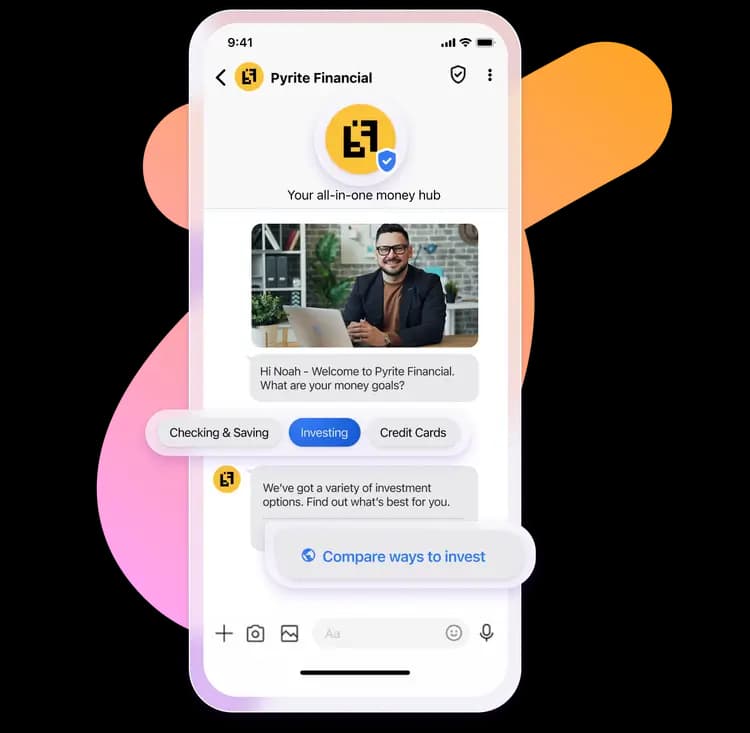
Suggested replies, tap-to-call, view location, and more
Trusted by 10,000+ businesses across India




















Two Kinds of Tap, Two Different Jobs
A suggested reply keeps the customer inside the conversation- tapping "Track my order" sends that exact text back to your flow, the same as if they'd typed it themselves. It's the building block behind branching chatbot flows, covered in more depth on our RCS chatbot & automation page.
A suggested action does something outside the chat entirely- it dials a number, opens Google Maps, opens a specific web page, or drops an event into the customer's calendar. Both live as buttons directly inside the message or rich card, and both are part of what makes an RCS message something a customer acts on immediately instead of reading and forgetting.
Every Action a Message Can Trigger
A single message or rich card can combine several of these at once, giving the customer more than one way to respond.
Suggested replies
Tappable quick-reply chips a customer taps instead of typing- 'Yes', 'Remind me later', 'Track my order'- each one a pre-written response the flow already knows how to handle.
Tap-to-call action
A button that dials your business number directly from the message- no copying a number or opening a separate app.
View location action
Opens the nearest store or branch directly in Google Maps from within the message- useful for retail, banking, and hospitality alerts.
Open URL action
A button that opens a specific web page- a product listing, a payment link, a tracking page- inside the customer's browser.
Add to calendar action
Adds an appointment, delivery slot, or event directly to the customer's calendar app with one tap, no manual entry.
Share location action
Lets the customer share their own location back to you- useful for delivery coordination or service-visit scheduling.
Plain Text, Rich Cards, or Carousels- Same Building Blocks
Suggested replies and actions attach to a plain text message, a single rich card, or every card in a carousel- see our rich media features page for how those formats work, and Get Click Media pairs the right interactive elements with each as part of campaign setup.


Largest CPaaS partner for Interactive Messaging
Get Click Media enables brands to turn every message into a one-tap action with suggested replies on RCS.

One message could
change your business.
Big or small, we power communication for all- talk to us today.
RCS Interactive Messaging FAQs
A suggested reply is a quick-reply chip that sends a pre-written text response back into the chat, continuing the conversation. A suggested action triggers a device function instead- dialing a number, opening a map, opening a URL, or adding a calendar event- without sending a reply message.
RCS messages support a limited row of suggested reply chips and action buttons per message, enough for a handful of clear next steps- Get Click Media designs each flow so the options stay short and unambiguous rather than overloading a single message.
Yes- the open-URL action can point to any web page, such as a product listing, payment gateway, or order-tracking page, and opens it in the recipient's default mobile browser with a single tap.
No- suggested replies and suggested actions are native RCS features. When a recipient doesn't have RCS support and the message falls back to plain SMS, those interactive elements aren't available, though Get Click Media's platform still delivers the core message and any linked URL as plain text.
Yes- tapping a suggested reply chip sends that response back into the conversation, which can trigger the next step in an automated flow. See our RCS Chatbot & Automation page for how these chips drive branching conversations.
Yes- our team configures the suggested replies, action buttons, and the flow logic behind them as part of campaign setup, so you don't need to build this against Google's API directly.
Ready to make every message tappable?
Get Click Media configures suggested replies, actions, and the flow logic behind them for your RCS campaigns.