
RCS Brand Verification for a Trusted Sender Identity
Google's review process that puts your logo, business name, and a verified badge on every message you send through Google Messages.
Agent registration and Google review handled as part of onboarding
Trusted by 10,000+ businesses across India




















An Unknown Number vs a Verified Brand
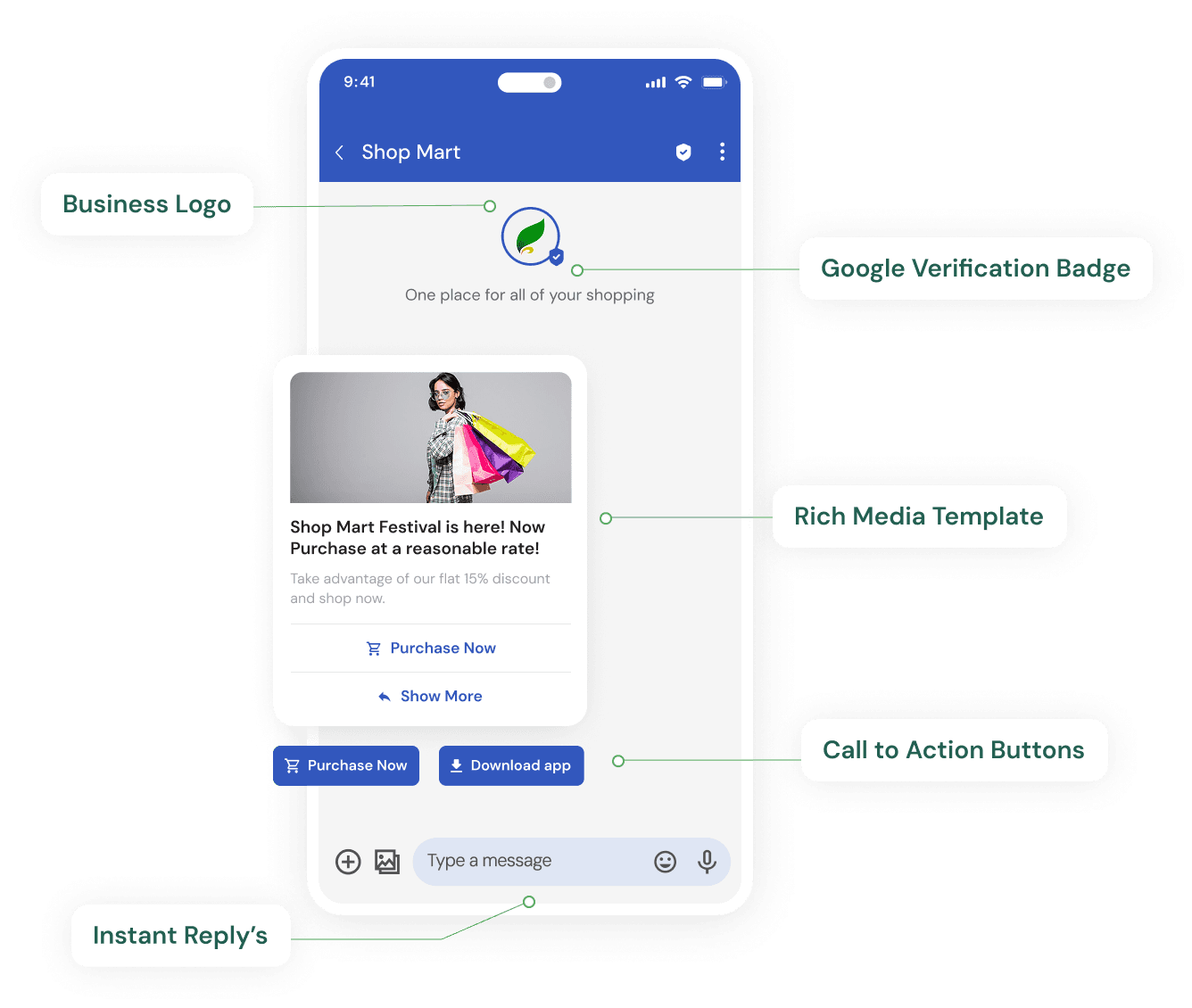
Plain SMS gives a customer a phone number and nothing else- no way to confirm who's really messaging them. That ambiguity is exactly what phishing texts exploit. RCS brand verification closes that gap: once approved, your business name, logo, and a blue verified badge appear on every message, so the recipient can confirm at a glance that the sender is genuinely you.
This is also what separates a verified RCS sender from Rich Business Messaging in name only- the verification and the branded identity are the same underlying mechanism Google uses across its RBM product. See our Rich Business Messaging (RBM) page for how the naming fits together.
From Agent Registration to Verified Badge
Get Click Media manages this entire process on your behalf as an official Google RCS Business Messaging partner, from initial registration through to the verified badge going live.
1. Register as an RCS agent
Your business is registered as a messaging agent through Google's Business Communications Console- the entry point for any brand sending RCS messages.
2. Submit business & brand details
Business name, logo, brand colour, and supporting documentation go to Google for review- proof that the sender is who it claims to be.
3. Google reviews for legitimacy
Google checks the submission against its anti-spoofing and brand-safety criteria before approving the agent to send verified messages.
4. Verified badge goes live
Once approved, your logo, business name, and a blue verification badge appear on every message you send through Google Messages.
What Changes Once a Business Is Verified
Each of these compounds- a verified badge alone helps, but combined with a branded header and impersonation protection, the effect on recipient trust is larger than any single element.
Verified sender badge
A visible checkmark next to your business name on every message- the same visual trust signal recipients look for on verified social accounts.
Branded header
Your logo and business name appear at the top of the conversation thread, not just inside individual messages.
Protection against impersonation
Verification is tied to your registered business identity, making it harder for unrelated senders to impersonate your brand inside Google Messages.
Higher recipient trust
A verified badge next to a recognisable logo measurably improves open and response rates compared to an unverified or unknown sender.
Get Click Media manages registration and follow-up with Google so verification lands as part of your standard RCS onboarding timeline- see our RCS service provider page for the full setup process.
What Google Checks During Review
Meeting these four criteria before submitting is the single biggest factor in getting approved on the first attempt rather than needing a resubmission.
A registered business entity
A legally registered company, LLP, or proprietorship- Google's review checks the business behind the agent actually exists and matches the submitted documentation.
Brand assets that match your public identity
Your logo and business name must match how customers already recognise you elsewhere- a mismatch between submitted assets and your public brand is a common reason a first submission gets sent back.
A compliant message use case
The messaging use case declared during agent registration- OTPs, order updates, marketing- has to match what the agent actually sends once live, per Google's RCS Business Messaging policies.
An accessible point of contact
A reachable business contact for Google's review team to follow up with if the submitted documentation needs clarification during the review.


Largest CPaaS partner for Brand Verification
Get Click Media enables brands to earn a verified sender badge and build trusted messaging identity with RCS.

One message could
change your business.
Big or small, we power communication for all- talk to us today.
RCS Brand Verification FAQs
RCS brand verification is Google's review process that confirms a business sending RCS messages is who it claims to be, before displaying that business's name, logo, and a verified badge on every message sent through Google Messages.
Yes, functionally- an RCS agent must be registered and approved through Google's Business Communications Console before it can send verified business messages. Without it, messages don't carry the branded sender identity that makes RCS distinct from anonymous SMS.
Timelines depend on Google's review queue and how complete the submitted business documentation is. Get Click Media handles the submission and follow-up as part of onboarding, so most businesses go live within the standard RCS setup window- see our RCS Service Provider India page for the full onboarding timeline.
Yes- agent registration, brand asset submission, and Google's review process are all handled as part of Get Click Media's standard RCS onboarding, so you don't manage that relationship with Google directly.
Messages can still be configured to send, but without the verified badge, logo, and branded header that come with an approved agent. Get Click Media typically completes verification before a campaign goes fully live.
Yes- Google can revoke agent verification if a business is found to violate its messaging or brand-safety policies. Get Click Media follows Google's guidelines closely during campaign setup to keep your verified status intact.
They're separate processes run by different platforms, but they serve the same purpose- a checkmark that confirms a business's identity to the recipient. RCS verification is run through Google's Business Communications Console rather than Meta's WhatsApp Business verification.
Ready to get your business verified on RCS?
Get Click Media handles agent registration and Google's brand verification review from start to finish.