
RCS vs Facebook Messenger: A Complete Comparison for Businesses
No Facebook account required, no Page-based setup, and a per-message pricing model- see exactly where RCS pulls ahead of Facebook Messenger, and where Messenger's installed base and bot ecosystem still give it real advantages.
Trusted by 10,000+ businesses across India

Trusted by 10,000+ businesses across India




















RCS vs Facebook Messenger: The Short Version
RCS reaches any RCS-capable Android device directly through Google Messages, with no Facebook account, Page, or Messenger install required on the customer's side, and no session window restricting when you can send. Facebook Messenger has a real, mature business API tied to a Facebook Page, with quick replies, generic templates, and a large installed base, but it generally expects the customer to have messaged first and restricts sends outside a 24-hour window to narrow approved message tags.
Choose RCS when you need account-free reach, Google-verified branding, and straightforward per-message sending without Page setup or message-tag limits. Facebook Messenger fits better for multi-turn support conversations with an audience already active on Facebook, using its bot ecosystem and persistent menu. Most Get Click Media clients run RCS for direct Android reach and Messenger for the audience segment already engaged there, managed under one strategy.
RCS Business Messaging, in One Paragraph
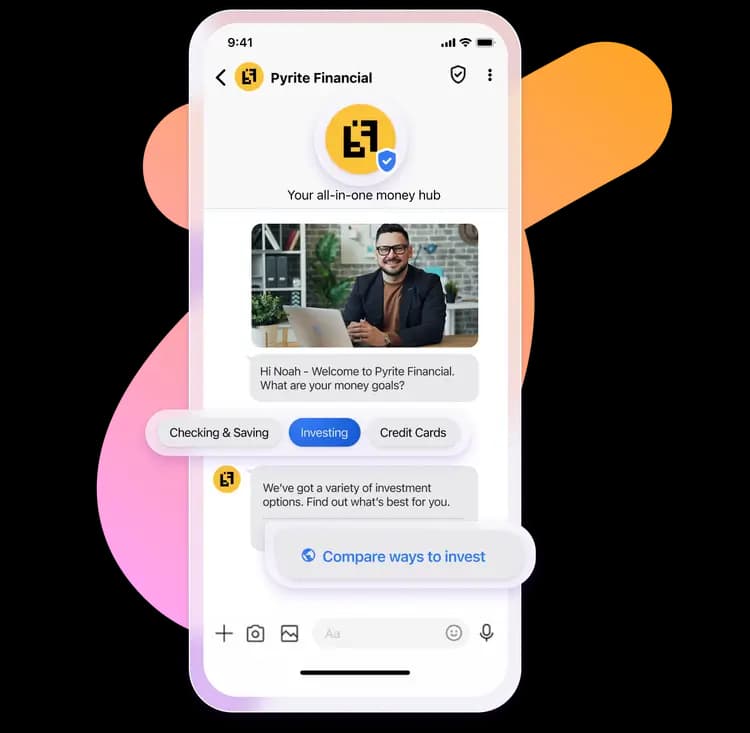
RCS (Rich Communication Services) is Google's modern messaging standard, built directly into the Google Messages app that ships as the default SMS/messaging app on most Android phones. A business can send a Google-verified, rich-media message- images, carousels, CTA buttons- straight into a customer's existing message thread, with no app download and no Facebook account or Page required on either side.
The Messenger Platform, in One Paragraph
Facebook Messenger has a real, documented business API- the Messenger Platform- tied to a Facebook Page rather than a phone number. A business builds and sends through this platform, commonly via a bot or a BSP-style integration, reaching customers who have a Facebook account and the Messenger app or inbox. Meta governs sending with a standard 24-hour messaging window after a user-initiated message, and a set of narrow, approved message tags for specific cases outside that window.
RCS vs Facebook Messenger, Feature by Feature
| Feature | RCS | Facebook Messenger |
|---|---|---|
| Rich Images | ✅ | ✅ |
| Carousels | ✅ (native rich cards) | ✅ (generic template, via bot/API) |
| CTA Buttons | ✅ | ✅ (button & quick-reply templates) |
| Verified Brand | ✅ (Google) | Limited (Meta Verified Page badge, separate & largely gated) |
| Read Receipts | ✅ | ✅ |
| Analytics | ✅ | Varies by bot platform/BSP |
| API Integration | ✅ (open, documented) | ✅ (Messenger Platform, tied to a Facebook Page) |
| Customer Experience | High, no account needed | High, requires a Facebook account + Messenger |
| Messaging window | No session window- every message stands alone | 24-hour window; outside it, only approved message tags |
RCS vs Messenger Business Setup
This is one of the more practical differences between the two channels. RCS can reach a customer within Google's content guidelines with no account or Page setup on the customer's side. Facebook Messenger business messaging is built and sent through a Facebook Page, and generally expects the customer to have initiated contact before your business can message freely.
| Aspect | RCS | Facebook Messenger |
|---|---|---|
| Getting started | No customer action needed- RCS is native to Google Messages on any RCS-capable Android device, on by default for most users. | Requires your business to have a Facebook Page- the Messenger Platform is built and sent through that Page, typically via a bot or BSP-style integration, not a phone number. |
| Customer requirement | Customer just needs an RCS-capable Android device- no account creation, no app install. | Customer must have a Facebook account and the Messenger app or inbox to receive and reply to messages. |
| First message | Can send within Google's RCS Business Messaging content guidelines without a prior customer-initiated message. | Meta's messaging policies generally expect the customer to have messaged first, or the send to fall under a narrow, approved message tag- open-ended promotional sends outside that are restricted. |
RCS vs Messenger Messaging Window Model
RCS treats every send as an individual message with no session window. Messenger opens a 24-hour messaging window after a customer-initiated message, and restricts sends outside that window to a narrow set of approved message tags- structurally similar in spirit to how WhatsApp's session window and templates work, though the specifics (tags vs. templates) differ.
| Aspect | RCS | Facebook Messenger |
|---|---|---|
| Message structure | Priced and sent as individual messages- each send is its own unit. | Meta doesn't bill per message on the Messenger Platform, but sending is still governed by the standard 24-hour messaging window. |
| Session window | No equivalent session window- each RCS message stands alone. | A 24-hour window opens after a user-initiated message, during which a business can reply freely. |
| Sending outside the window | No template pre-approval needed for standard rich cards within guidelines. | Outside the 24-hour window, only specific message tags are allowed- narrow, non-promotional cases like confirmed event updates or post-purchase updates, not open-ended promotional sends. |
Why RCS vs Messenger Pricing Isn't a Direct Comparison
RCS is priced per message sent, the same way SMS is. Facebook Messenger is different- Meta doesn't bill per message for sends through the Messenger Platform the way it bills WhatsApp Business API conversations, so there's no per-message or per-conversation rate card to line up against RCS rupee-for-rupee. That makes this an apples-to-oranges comparison- there's no direct per-message billing on the Messenger side, so the real comparison is reach and format, not cost. See our RCS Pricing India page for current RCS rates.
Two Genuinely Rich Channels, Different Formats
Rich cards & generic templates
RCS renders swipeable rich cards natively in the message thread- Messenger's generic and button templates are genuinely rich too, but built and sent through the bot-driven Messenger Platform rather than a native chat format.
Quick replies & persistent menu
Messenger's quick replies and persistent menu give a bot a structured way to guide a conversation- RCS ties similar suggested replies directly to its card format.
Buttons & CTAs
Both platforms support tappable buttons that jump straight to a link, call, or reply- RCS as part of the core rich card, Messenger through button and generic templates.
Read receipts & typing indicators
Both channels show read receipts and typing indicators, giving businesses real-time visibility into message status.
RCS vs Messenger Reach: The Question That Matters Most
Facebook Messenger can only message a customer who has a Facebook account and the Messenger app or inbox active. RCS works natively inside Google Messages, the default app on any RCS-capable Android device- no Facebook account, no Messenger install, and no requirement that the customer be reachable on Meta's platforms at all.
| Aspect | RCS | Facebook Messenger |
|---|---|---|
| App/account requirement | None- works inside the default Google Messages app that ships on Android, no download or install. | Customer needs an active Facebook account and the Messenger app or web inbox to be reachable at all. |
| Contact requirement | No prior opt-in or message from the customer needed to be reachable, within Google's content guidelines. | Generally needs the customer to have initiated contact, or fall under Meta's narrow allowed message tags, to be reachable outside the 24-hour window. |
| Device/OS reach | Native on RCS-capable Android devices; falls back to SMS elsewhere. | Works across Android, iOS, and desktop web- wherever the customer has Facebook/Messenger installed and active. |
| India audience trend | Reaches any RCS-capable Android device directly, regardless of whether the user has Facebook or Messenger installed at all. | Large installed base in India, though usage- especially among younger users- has shifted increasingly toward WhatsApp and Instagram in recent years. |
No app install for RCS
RCS lives inside Google Messages by default on supported Android devices- there's no separate download or account creation step for the customer.
Messenger's global installed base
Where a customer already has Facebook and Messenger active, it offers a mature bot ecosystem and a familiar inbox many people check daily.
Always-reachable vs contact-initiated
RCS can reach a customer without a prior message from them, within Google's guidelines; Messenger's 24-hour window and message tags generally expect the customer to have made contact first.
Combined reach strategy
Running both channels together- RCS for direct Android reach, Messenger for the audience segment still active on Facebook- covers more of your audience than either alone.
Google's RCS Verification vs Meta's Page Verification
Both companies run their own verified-sender systems, but they aren't equivalent mechanisms. Google verifies and badges RCS senders as part of RCS Brand Verification, confirming your business name and logo before messages carry the checkmark. There's no equivalent to that badge for a generic Messenger bot the way there is for a verified Facebook Page- Meta Verified is a separate, more limited program that's largely paid or eligibility-gated, not a mechanism for verifying a business's Messenger bot integration itself. See our RCS OTP page for how verified sending applies specifically to authentication messages.
| Aspect | RCS | Facebook Messenger |
|---|---|---|
| Verifying authority | Google reviews and verifies the business identity for RCS Business Messaging. | Meta offers Page verification ('Meta Verified' blue badge) as a separate program from the Messenger Platform itself. |
| What the badge shows | Verified business name, logo, and a checkmark inside Google Messages. | A blue badge next to the Page name on Facebook- signalling Page authenticity, not specifically a bot or business-messaging credential. |
| Approval difficulty | Verification managed through the RCS Business Messaging partner process- see our RCS Brand Verification page. | Meta Verified is largely a paid or eligibility-gated program, and isn't the same mechanism as verifying a business's Messenger bot integration. |
| Effect on trust | Verified badge appears on every message from day one of approval. | A typical business bot on Messenger carries no equivalent per-message verification badge the way an RCS sender does. |
Campaign Visibility on Both Channels
RCS campaigns through Get Click Media's RCS Analytics report read receipts, button-tap tracking, and carousel engagement in one dashboard. Facebook Messenger analytics depend on which bot platform or BSP you've built on- quality and depth vary considerably, whereas RCS reporting through Get Click Media stays consistent across every campaign.
Two Real APIs, One Platform to Manage Both
Both channels are genuinely programmatic. The Get Click Media RCS API sends rich cards, carousels, and buttons without a template pre-approval step for standard content. The Messenger Platform is a real, documented business API too, but it's tied to a Facebook Page and governed by Meta's 24-hour window and message-tag rules rather than open-ended sending. Get Click Media can integrate both under one account, so you're not managing two separate vendor relationships.
When RCS Wins, When Messenger Wins
RCS fits best for
- OTPs and transactional alerts needing instant, account-free reach
- Promotional campaigns to Android-heavy audiences
- Order tracking and delivery updates without a message-tag restriction
- Brands wanting Google-verified sending with no per-conversation billing
Facebook Messenger fits best for
- Customer support conversations with an already-engaged Facebook audience
- Bot-driven flows using generic templates, quick replies, and a persistent menu
- Audiences with high existing Facebook/Messenger usage and familiarity
- Multi-turn conversations that benefit from the 24-hour messaging window
Which is Better, RCS or Messenger? Honest Trade-offs
RCS
No Facebook account or Messenger app required on the customer's side
Google-verified branding and checkmark
No per-conversation billing- priced per message sent
No template pre-approval needed for standard messages
Native to the default Android messaging app
Automatic SMS fallback for unsupported devices
iOS support still maturing compared to Android
Full rich-media experience needs an RCS-capable device
Smaller installed daily-chat habit than Messenger among some demographics
Facebook Messenger
Massive global and Indian installed base with a mature bot ecosystem
No per-message billing from Meta on the Messenger Platform itself
Generic templates, quick replies, and persistent menu support rich interactions
Familiar inbox many customers already check daily
Works across Android, iOS, and desktop web
Requires the customer to have a Facebook account and Messenger installed or active
Business messaging is tied to a Facebook Page, not a phone number, adding setup overhead
Outside the 24-hour window, only narrow approved message tags can be used- not open promotional sends
No RCS-style per-message verification badge for a typical business bot
Usage among younger Indian users has shifted increasingly toward WhatsApp and Instagram
A Simple Decision Matrix
Choose RCS if you want...
- Reach without requiring a Facebook account or Messenger install first
- Simple per-message pricing, not a Page-and-bot setup
- Google-verified branding without a hard-to-get approval bar
- No message-tag restrictions for standard transactional or promotional content
Choose Facebook Messenger if you want...
- To reach an audience already active on Facebook daily
- Multi-turn support conversations within a 24-hour messaging window
- Generic templates, quick replies, and a persistent menu built into the chat
- Cross-platform reach across Android, iOS, and desktop web
Most Get Click Media clients run RCS and Facebook Messenger side by side- RCS for direct Android reach without account friction, Messenger for the segment of their audience already active on it, managed through one strategy.
One Platform for RCS and Messenger Together
Trusted by 10,000+ businesses across India for messaging infrastructure that doesn't force a choice between reach and rich experience.
Verification handled for RCS
Google's RCS verification is managed as part of onboarding, so your messages carry a verified identity from day one.
RCS and Messenger on one strategy
Plan both channels together instead of managing a separate Page, bot, and vendor relationship for each one.
Unified analytics across both channels
See RCS engagement and Messenger conversation data side by side, instead of stitching together two reporting tools.
One API, both channels
Integrate once through the Get Click Media API and send RCS or Messenger Platform messages from the same codebase.
Not sure which channel fits your audience?
Talk to our experts about running RCS and Facebook Messenger together, with unified reporting and one integration.


Largest CPaaS partner globally
Get Click Media enables brands to move beyond Page-tied Messenger bots with verified RCS messaging that reaches every Android user directly.

One message could
change your business.
Big or small, we power communication for all- talk to us today.
RCS vs Facebook Messenger FAQs
It depends on the use case. RCS reaches any RCS-capable Android device natively with no Facebook account or app required, and prices per message. Facebook Messenger taps into a huge existing installed base and a mature bot ecosystem, but requires the customer to have Facebook and Messenger active. Many businesses run both rather than choosing one.
Yes. The Messenger Platform is built and sent through a Facebook Page, not a phone number- a business typically integrates a bot or a BSP-style solution against that Page to send and receive messages.
Messenger supports genuinely rich elements through the Messenger Platform- images, generic and button templates, quick replies, and a persistent menu. It's API/bot-driven rather than the native rich-card format built directly into RCS, but the two achieve a similar visual result in different ways.
No. RCS works inside Google Messages, the default messaging app on Android, so a customer needs only an RCS-capable device- no Facebook account, no Messenger app, no separate sign-up.
It's the standard messaging window Meta opens after a user initiates a conversation- during that 24 hours a business can reply freely. Outside the window, Meta restricts sends to specific approved message tags for narrow, non-promotional use cases like confirmed event updates or post-purchase updates, rather than open-ended promotional messaging.
Not quite the same thing. Google verifies and badges RCS senders as part of RCS Business Messaging onboarding. Meta's closest equivalent is Page verification ('Meta Verified'), a separate, more limited program that's largely paid or eligibility-gated- it isn't a mechanism for verifying a business's Messenger bot the way RCS verification works per sender.
Yes, and it's a common approach- RCS for direct Android reach without requiring Facebook or Messenger at all, and Messenger for the audience segment that's already active on Facebook, both manageable through one messaging strategy.
Facebook and Messenger have a large but declining-relative-to-WhatsApp user base in India, particularly among younger users who've shifted primarily to WhatsApp and Instagram. RCS reaches any RCS-capable Android device directly, with no requirement that the customer has Facebook or Messenger installed or active at all.
No. Meta doesn't bill for Messenger Platform sends the way it bills WhatsApp Business API conversations. That said, there's no meaningful like-for-like rate-card comparison against RCS either- the more useful comparison between RCS and Messenger is reach and format, not cost.
Relatively, yes- WhatsApp has become the dominant everyday messaging habit for most Indian users, especially younger demographics, while Facebook/Messenger usage for personal chat has slipped by comparison. Messenger still has a real, usable business platform, but RCS's advantage is that it reaches Android users directly without needing Facebook or Messenger at all.
Related resources
RCS resources
Still deciding between RCS and Facebook Messenger?
Get Click Media runs both channels on one strategy- book a free demo and we'll map out the right mix for your business.